Simple Player
The player displays a falling-note piano roll and sends MIDI events to a Windows MIDI output or embedded SYNCore. This page describes the upcoming 1.10 development version. Ordinary MIDI files, prepared compressed files, and editor playback use the same playback engine. To save a video with synthesized audio, see MP4 export.
- Click Tools... → On-drive MIDI Player in the main window.
- In Open MIDI or archive, click Browse... and choose a MIDI or supported archive.
- Wait for scanning or archive preparation. The Simple MIDI player opens paused.
- Press the play icon. A fresh start has a three-second lead-in; the status shows Starts in ...s before MIDI time begins.
The player opens the source file directly. You do not need to add it to the merge list. Conversion filters from that list are not an automatic preview of the processed output; convert and open the result to check those settings.
The player uses the selected or saved MIDI output. Available Windows device names depend on your system; they may include Microsoft GS Wavetable or OmniMIDI, with KDMAPI support for OmniMIDI. Builds containing SYNCore also show SYNCore (embedded).
To change output, press Stop, select a device in the player, then restart with the play icon. A paused run still owns the output, so pausing alone does not allow a device change. The selected output is shared with editor playback and note audition. Configure SYNCore through Settings... → SYNCore...; see SYNCore output.
| Control | Behavior |
|---|---|
| Play / Pause icons | Start or pause the current run. After Stop or the end of a run, Play prepares the selected source again and leaves it paused; press Play again to resume. |
| Stop icon | Stop the run and reset playback. The source remains selected for restarting. Closing the player also stops playback. |
| Viewport-length slider | Change the time span drawn in the visualization. This does not change playback speed. |
| Status field | Show scan progress, the start countdown, or playback time. |
| Simulate lag / Allow unbuffered | In Simulate lag, hold the visual clock back when there are not enough parsed notes to fill the viewport. Allow unbuffered lets the display follow playback even when future notes are not ready. This is a visualization setting. |
| Device list | Select the Windows MIDI output or embedded synth while stopped. |
| Maximise / Restore | Expand the player within SAFC or restore its previous layout. |
| Playback-position slider | Seek to a fraction of the file's duration. The seek is committed when you release the slider. |
| Overlaps drawn / Naive OR / R/t OR (Beta) | Cycle visualization overlap handling. The initial button may read R/t OR. These modes do not edit or remove MIDI notes. |
| Render... | Open MP4 export settings for the current source. |
Seeking rebuilds controller/program state and notes held at the target. Notes spanning the target are re-struck; this is not restoration of the synth's exact earlier audio waveform. A seek made while paused returns to the paused state. Dense files can take time to seek because the engine reads earlier events to reconstruct that state.
When Simple MIDI player or Open MIDI or archive is the frontmost inner window, dropping files opens the first non-empty filename through the same file-opening path. It replaces the current player source; it does not create a playlist or add the files to the merge list.
Bring the main merge window forward before dropping files intended for conversion. Use Load MIDI to open an editable document in the editor.
The direct-open dialog includes .mid, .midi, .xz, .zip, .7z, .gz, and .bz2. XZ, ZIP, 7z, GZip, and BZip2 layers can be nested, up to 16 decoded compression/archive layers. A combined container and compression filter can count as more than one layer.
At each archive level, SAFC uses the first regular file entry whose name matches a MIDI or recognized archive suffix, skipping directories and unrelated entries. There is no archive-member picker or playlist. Use an archive containing one intended MIDI, or extract the desired member yourself when an archive contains several candidates.
Opening a compressed source is a preparation step: SAFC reads the contained MIDI and writes its playback events into a temporary Zstandard-compressed page cache. Playback begins only after preparation completes. The full decompressed .mid is not written to disk. A nested 7z stream can require an additional temporary copy of that compressed inner archive to provide random access.
The preparation dialog reports the archive layers, tracks, and indexed events. Cancel, or closing that dialog, requests cancellation. The prepared source then uses the regular player controls and can also be used for MP4 export.
Current limits:
- The Windows temporary directory must be writable and have room for the event cache and any nested-7z copy. These are temporary files, retained while the prepared source or an export reader uses them; the cache is not persistent between sessions.
- Compressed playback requires PPQ timing. SMPTE-time MIDI is currently rejected by this path.
- MIDI channel events and tempo changes are used for playback. SysEx is skipped by the compressed source.
- Seeking replays the cached event prefix; it does not provide instant indexed seeking into the original archive. Restarting a prepared source reuses its cache.
- Supported compression methods still depend on the archive decoder in the build. The presence of libarchive does not mean every archive format is accepted by this opening path.
Ordinary MIDI input is memory-mapped and scanned for playback information. During playback, the parser reads ahead into an event queue instead of constructing the editor's complete editable note model. The current time-based lookahead is five seconds, with a separate pending-event throttle for very dense passages. Visualization also keeps note data as needed.
These controls are not a fixed process-memory limit. Dense same-tick events, long or overlapping notes, track/page indexes, the synth bank, and synthesis settings all consume memory. Compressed input reduces the need to store a raw MIDI but still needs preparation time, temporary disk space, and memory for decoded pages and playback. Loading time, disk speed, note density, available memory, and the selected synth affect the result; there is no blanket performance guarantee relative to other players.
If playback is silent or a device change is rejected, see Troubleshooting and SYNCore output.
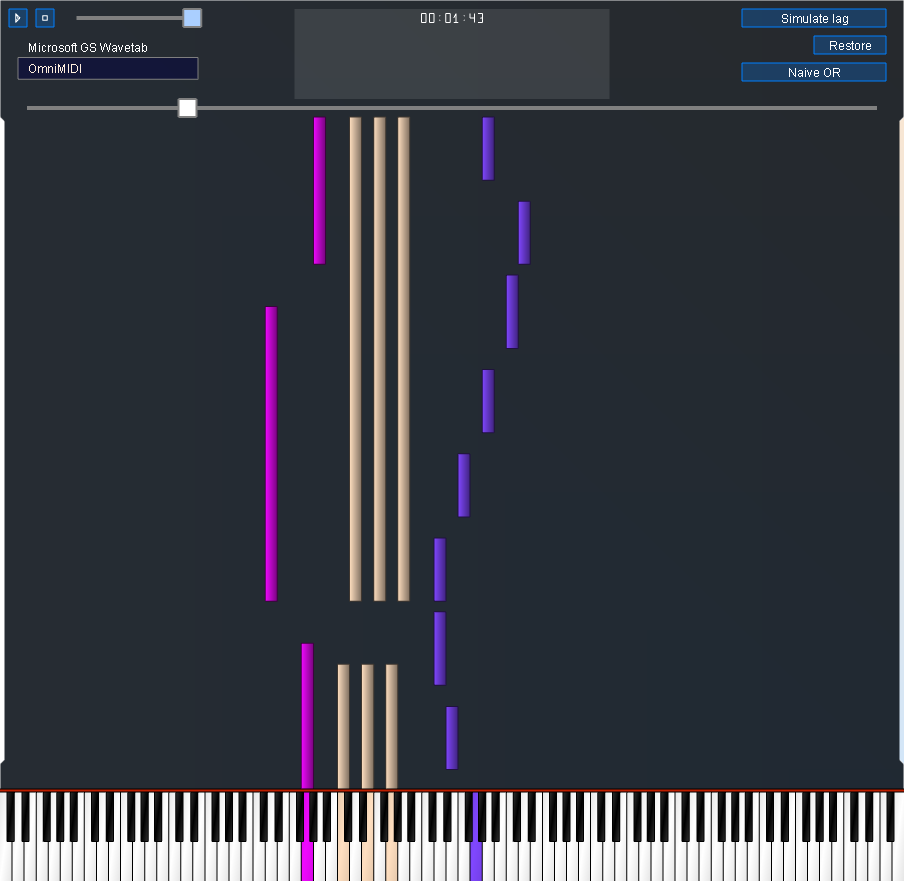
Player in the v1.9.1.0 development build, paused after briefly playing the demo MIDI. The viewport-length slider is near its maximum. This screenshot predates the 1.10 Render button and embedded SYNCore output; the device list reflects the capture machine.
| Embedded MIDI player in v1.7.0.0 |
|---|
 |
| Maximised player in v1.7.0.0 |
|---|
 |
The v1.7.0.0 screenshots predate newer overlap controls and the editor.
Source references: player UI and callbacks, playback implementation, and compressed source.