Home
SAFC is a Windows MIDI converter and merger with an embedded MIDI player and piano-roll editor. It began as a tool for repairing difficult MIDI files and changing PPQ and tempo; combining MIDIs with different timebases grew out of that work.
The project is maintained as a legacy application. The current name, Simple AF Complex, reflects the player and editor added alongside the original converter.

New to SAFC? Read Getting started. Keep your original MIDIs and save processed or edited results to a different path.
| I want to… | Guide |
|---|---|
| Download and run SAFC | Getting started · Latest release |
| Convert, repair, or merge files | MIDI list · Per-file properties · Merging |
| Understand PPQ, offsets, and tempo | MIDI concepts |
| Change note velocities or pitch ranges | Volume map · Cut and transpose |
| Filter events or handle unusual files | Other MIDI settings · MIDI quirks |
| Inspect timing and note activity | MIDI Info Collector |
| Listen to a MIDI | Simple Player |
| Play a compressed MIDI or nested archive | Compressed MIDI and archives |
| Choose a SoundFont or configure embedded audio | SYNCore output |
| Export a piano-roll video with audio | MP4 export (beta) |
| Edit notes, controllers, or tempo | MIDI Editor · Editor tools |
| Run conversion from a script | CLI (beta) |
| Adjust defaults or solve a problem | Global settings · Troubleshooting |
| Build the program or update these pages | Building from source · Maintaining the wiki |
The latest published release checked on 6 September 2026 is v1.9.0.0 — Embedded MIDI Editor. Version 1.10 is upcoming, and its new controls and workflows are documented in What's new in 1.10.
The 1.10 review uses development commit e863e16 and the maintainer's pending synth and render fixes, identified in the documentation baseline. Screenshots still show the v1.9.1.0 development build captured on 31 August, or explicitly captioned older versions. They do not show the new Tools menu, SYNCore setup, or MP4 dialog. The guides describe checked source behavior and known limitations; they are not a guarantee that every MIDI or output device has been tested.
SAFC draws its own smaller windows inside the main application window. Drag their title bars to move them, and click a window to bring it to the front. They cannot be detached into separate Windows desktop windows.
- Most controls receive keyboard input while hovered. Move the pointer over an input field before typing.
- Checkboxes are colored squares: green = enabled, red = disabled.
- Hover buttons, fields, and checkboxes to read their tooltips.
- Use Alt+Up / Alt+Down to change UI scaling.
- Global settings establishes defaults for newly added MIDIs. Each file also has its own settings; review both when a conversion gives an unexpected result.
The list holds conversion inputs. Left-click selects or deselects entries; right-click opens a file's properties. The surrounding controls add/remove files, apply global timing changes, remove processing modules, choose the output path, and start conversion.
In upcoming 1.10, open Tools... to reach On-drive MIDI Player or Piano roll editor. The player can open a file directly without adding it to the conversion list. The older screenshot below still shows the previous player and editor buttons.
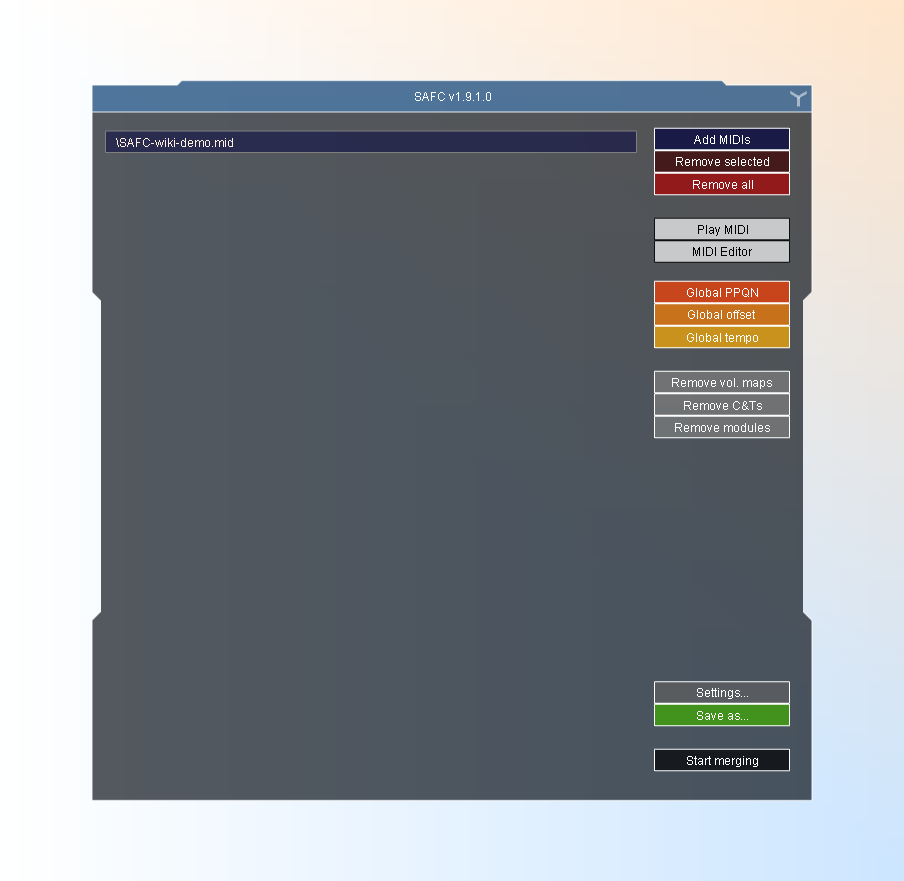
Main window in the v1.9.1.0 development build, captured 31 August 2026. Download the demo MIDI or see the editor and player views of the same file.
Earlier main-window illustrations
These are the illustrations from the original wiki introduction, retained as a reference for the converter layout. They do not show every newer control.


| Group | Purpose |
|---|---|
| 0 | List of loaded MIDIs. |
| 1 | Add MIDIs, remove selected entries, or clear the list. |
| 2 | Apply global PPQ, offset, or tempo changes. |
| 3 | Remove processing modules from inputs. |
| 4 | Settings and output destination. |
| 5 | Start merge. |
Project links: source repository, releases, and issue tracker.