Repository navigation
en providers agent runners dashscope
Since v3.4.30, AstrBot supports connecting to Alibaba Cloud Bailian Application.
On the Alibaba Cloud Bailian Application website, click to add a new application. Create an agent application, workflow application, or agent orchestration application according to your needs, and build the agent or workflow as required.
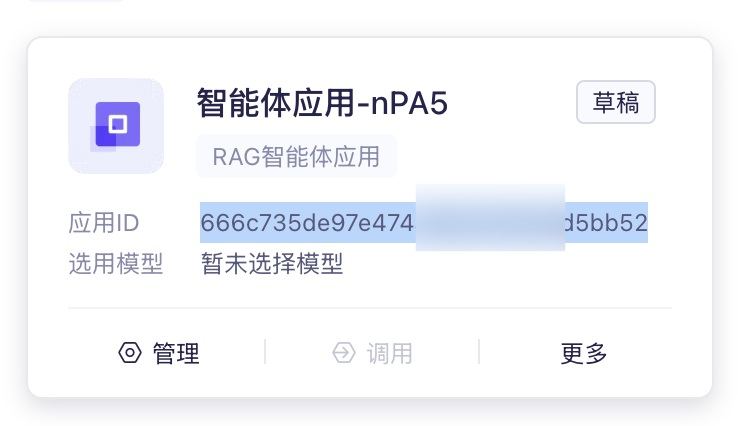
Record the Application ID:
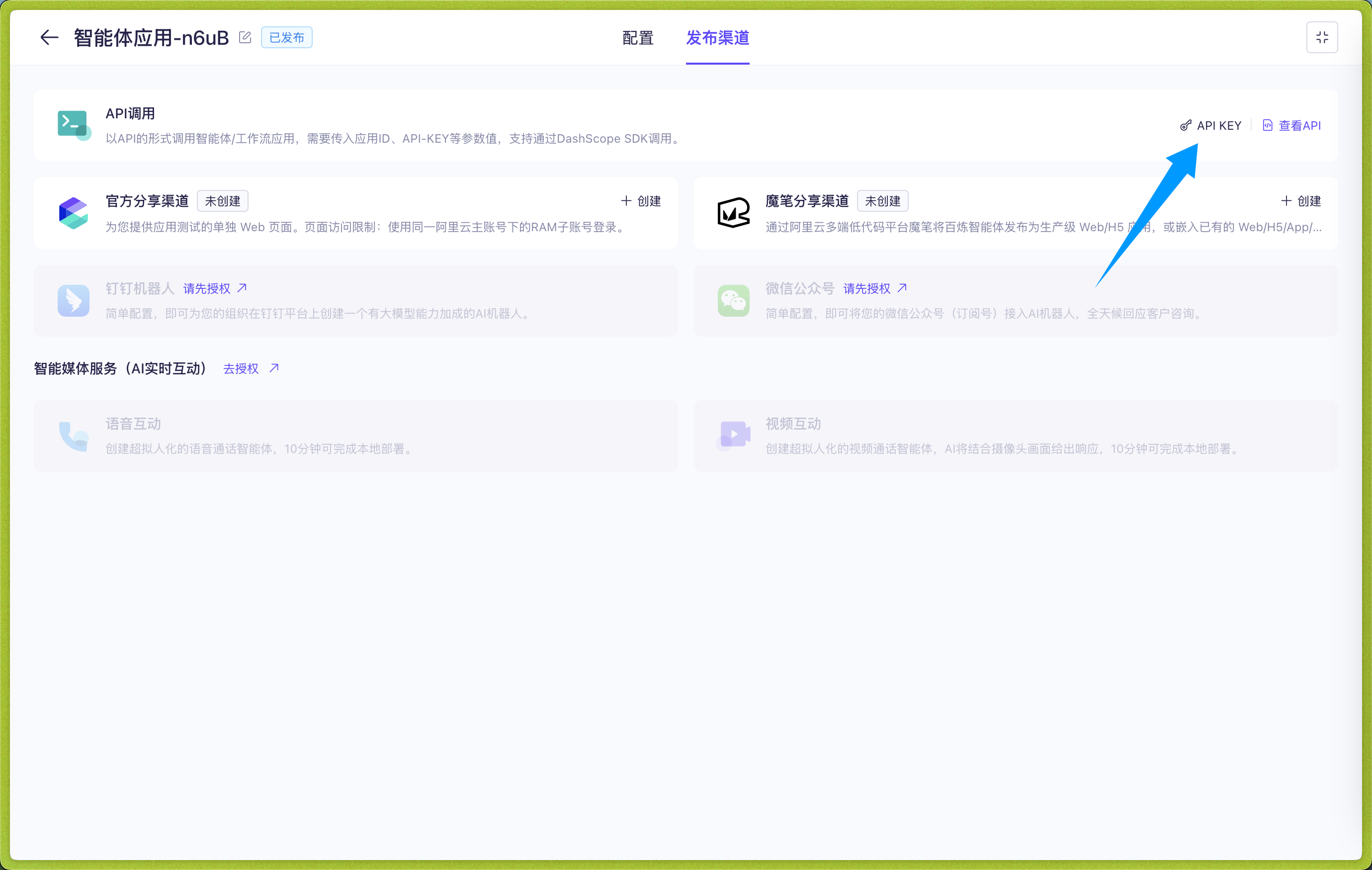
Click to enter the application, click Publishing Channel -> API Call -> API KEY, create and copy the API KEY:
In the WebUI, open Config, select the profile to edit, and open AI. Click More actions (…) beside the heading → Change Execution Mode, select Alibaba Cloud Bailian, read and check the reset acknowledgement, then click Use This Mode. Make sure Enable AI is on, then enter the connection settings on this page. Switching resets the current mode's configuration; see Agent Runner.
According to Alibaba Cloud Bailian Application, there are four application types:
- Agent Application (agent)
- Task Workflow Application (task-workflow)
- Dialog Workflow Application (dialog-workflow)
- Agent Orchestration Application (agent-arrange)
Tip
Multi-turn conversations are only supported for agent applications and dialog workflow applications. AstrBot will automatically attach conversation history for these two types of applications to support multi-turn conversations.
Please ensure that the Application Type configured in AstrBot matches the application type created in Alibaba Cloud Bailian Application.
Then fill in the Application ID in Application ID and the API KEY in API Key.
After filling in these three items, click Save Configuration.
When all fields are complete, click Save Configuration at the bottom right. This profile uses the selected execution mode and connection settings directly; no separate runner provider or provider ID selection is needed.
For the two workflow applications, you can dynamically set input variables in the chat area.
Use the /set command to dynamically set input variables, as shown in the figure below:
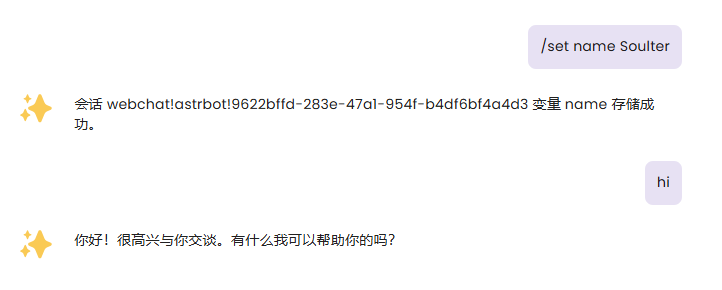
After setting variables, AstrBot will attach the variables you set in the next request to Alibaba Cloud Bailian Application, flexibly adapting to your Workflow.
Of course, you can use the /unset command to cancel the variables you set. For example, /unset name
Variables are permanently valid in the current session.
- 首页
- 文档入口
- Top Level
- community events
- config
- deploy
- dev
- others
- platform
- 接入 OneBot v11 协议实现
- 接入钉钉 DingTalk
- 接入 Discord
- 接入 Kook
- 接入飞书
- 接入 LINE
- 接入 Matrix
- 接入 Mattermost
- 接入 Misskey 平台
- 接入 QQ 官方机器人平台
- 通过 QQ官方机器人 接入 QQ (Webhook)
- 通过 QQ官方机器人 接入 QQ (Websockets)
- 接入 Satori 协议
- 接入 server-satori (基于 Koishi)
- 接入 Slack
- 接入消息平台
- 接入 Telegram
- 接入 VoceChat
- AstrBot 接入企业微信
- 接入企业微信智能机器人平台
- AstrBot 接入微信公众平台
- 接入个人微信
- providers
- use
- Home
- Docs Entry
- Top Level
- config
- deploy
- Deploy AstrBot on 1Panel
- Deploy AstrBot on BT Panel
- Deploy AstrBot on CasaOS
- Deploy AstrBot from Source Code
- Community-Provided Deployment Methods
- Deploy via Compshare
- Deploy with AstrBot Desktop Client
- Deploy AstrBot with Docker
- Deploy AstrBot with Kubernetes
- Deploy AstrBot with AstrBot Launcher
- Other Deployments
- Script Deployment
- Installation via System Package Manager
- Preface
- dev
- AstrBot Configuration File
- API Scope–Endpoint Reference
- AstrBot HTTP API
- AstrBot Plugin Market JSON Specification
- Developing a Platform Adapter
- plugin
- AI
- Text to Image
- Handling Message Events
- Plugin Configuration
- Plugin Internationalization
- Plugin Views
- Sending Messages
- Session Control
- Minimal Example
- Plugin Storage
- AstrBot Plugin Development Guide 🌠
- Publishing Plugins to the Plugin Marketplace
- ospp
- others
- platform
- Connect OneBot v11 Protocol Implementations
- Connect to DingTalk
- Connecting to Discord
- Connect to KOOK
- Connecting to Lark
- Connecting to LINE
- Connecting to Matrix
- Connecting to Mattermost
- Connecting to Misskey Platform
- Connect QQ Official Bot
- Connect QQ via QQ Official Bot (Webhook)
- Connect QQ via QQ Official Bot (Websockets)
- Connect to Satori Protocol
- Connect server-satori (Koishi)
- Connecting to Slack
- Messaging Platforms
- Connecting to Telegram
- Connect to VoceChat
- Connect AstrBot to WeCom
- Connect to WeCom AI Bot Platform
- Connect AstrBot to WeChat Official Account Platform
- Connect Personal WeChat
- providers
- Connect 302.AI
- Agent Runners
- Built-in Agent Runner
- Connect to Coze
- Connect to Alibaba Cloud Bailian Application
- Connect to DeerFlow
- Connect to Dify
- Connect AIHubMix
- coze
- dashscope
- dify
- Model input images
- Large Language Model Providers
- Connect MiraRouter
- NewAPI
- Connect PPIO Cloud
- Connect LM Studio to Use DeepSeek-R1 and Other Models
- Integrating Ollama
- Connect ShengSuanYun
- Connecting to SiliconFlow
- Connecting Model Services
- Connecting to TokenPony
- use
- Agent Execution Mode {#agent-runner}
- Agent Sandbox Environment
- astrbot sandbox
- AstrBot CLI {#cli-commands}
- Docker-based Code Interpreter
- Built-in Commands
- computer
- Context Compression
- Custom Rules
- AstrBot Knowledge Base
- MCP
- AstrBot Plugins {#astrbot-star}
- Proactive Capabilities
- Skills {#anthropic-skills}
- SubAgent Orchestration {#agent-handoff-and-subagent}
- Unified Webhook Mode
- Web Search
- DeepSeek Search API
- SerpApi
- WebUI


