
A modern take on the classic source code printing app from 1988.
Human and AI Agent friendly print utility with syntax highlighting, multiple pages-up, headers/footers. Cross platform (Mac, Linux, Windows) GUI, TUI, and CLI. Print source code, web pages, and reports generated by legacy systems.

The wp terminal UI renders true print previews as sixel/kitty graphics, without leaving the terminal: page through a document, zoom in, pan with the mouse, switch sheet definitions, and open another file.

Print (or dry-run with --what-if) straight from the shell — same sheet/printer options as the TUI and GUI.


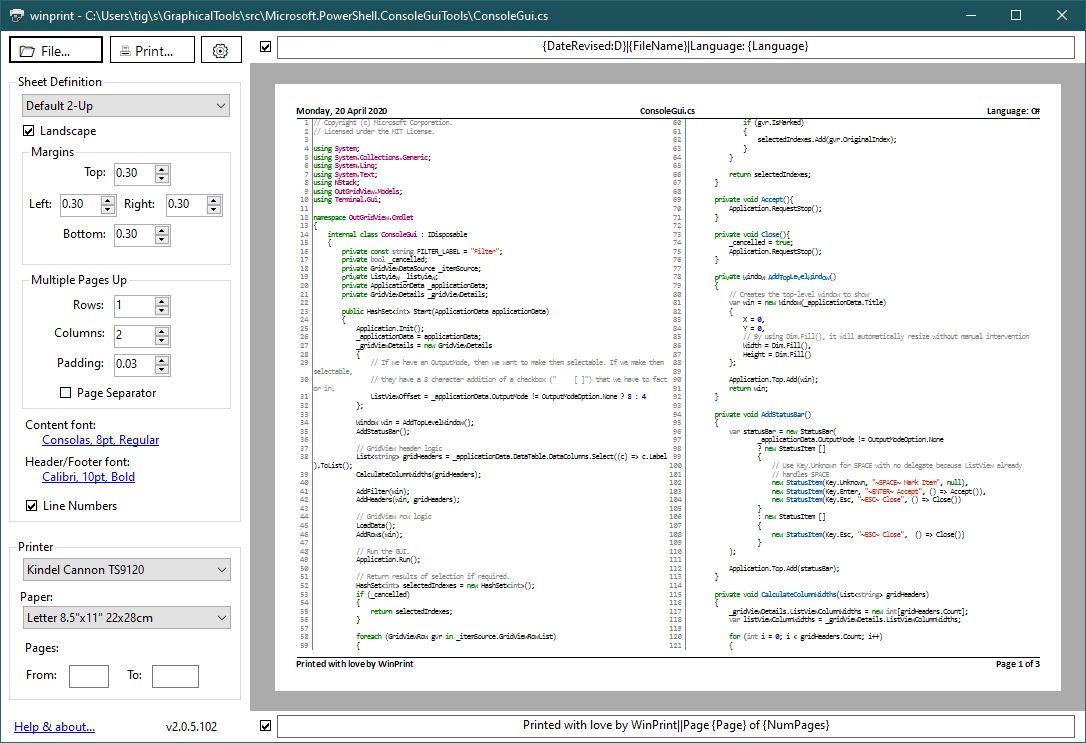
The GUI on Windows (left) and macOS (right): visual print preview, settings, and wp gui to launch from the terminal.
Install with Scoop — one command gives you both the GUI and the wp terminal UI:
scoop bucket add winprint https://github.com/kindel/scoop-winprint
scoop install winprint
Or download the signed installer Kindel.WinPrint-win-x64-Setup.exe from the
latest release and run it. (On new releases
SmartScreen may say it "isn't commonly downloaded" — that's a reputation check, not a signing
problem; the publisher reads Kindel, LLC. See the Installation Guide.)
winget install Kindel.WinPrintis coming soon (pending first submission to winget-pkgs).
brew tap kindel/winprint
brew install winprint # WinPrint GUI app — also bundles the `wp` terminal UIbrew install kindel/winprint/wp # `wp` terminal UI (the GUI is Windows/macOS only)See the Installation Guide for detailed instructions, prerequisites, and upgrade/uninstall steps.
Launch the TUI:
wpLaunch the GUI on Windows or macOS:
wp guiYou can also find WinPrint in the Start Menu (Windows) or via Spotlight (macOS).
- Prints source code in hundreds of programming languages with syntax highlighting and line numbering.
- Prints HTML files.
- Prints "multiple-pages-up" on one piece of paper (saves trees!)
- Complete control over page formatting options, including headers and footers, margins, fonts, page orientation, etc.
- Headers and Footers support detailed file and print information macros with rich date/time formatting.
- Simple and elegant graphical user interface with accurate print preview on Windows and macOS.
wpprovides a terminal UI on Windows, macOS, and Linux.wp guilaunches the GUI on Windows and macOS.- Sheet Definitions make it easy to save settings for frequent print jobs.
- Comprehensive logging.
- Cross-platform TUI; Windows and macOS GUI; Linux GUI is deferred.
The GUI is available on Windows and macOS via wp gui.
Open a file in the terminal UI:
wp Program.csPass print preview options:
wp Program.cs --printer "Microsoft Print to PDF" --sheet "Default 2-Up"Launch the GUI:
wp guiPrint headlessly:
wp print Program.cs --what-if --sheet "Default 2-Up"See the User's Guide for complete CLI documentation.
See CONTRIBUTING.md for development setup, build instructions, and release process.