

 中文版说明
中文版说明
TianRacer详细中文操作手册
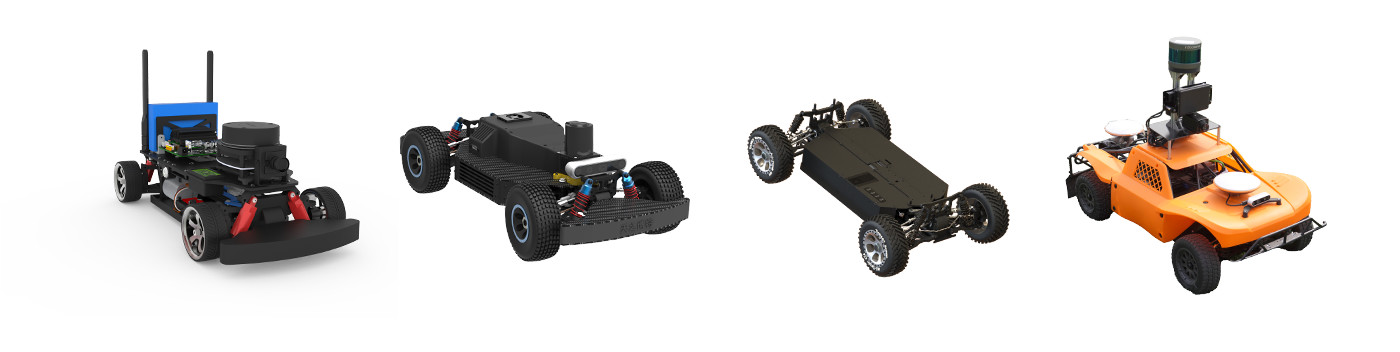
Tianracer is a series of low-cost autonomous vehicles ranging in size from 1:10 to 1:5, controlled in a closed-loop system, allowing them to follow input commands more faithfully. All Tianracer models are equipped with NVIDIA development boards, including Jetson Nano, Jetson TX2, Xavier, Orin, and more. The basic version of Tianracer can reach a maximum speed of 3m/s, while the pro version can achieve speeds up to 10m/s.
TianRacer ROS Wiki Our objective is to develop an affordable autonomous racing car, the Tianracer, with capabilities extending beyond basic mapping, localization, and navigation. It will feature advanced functionalities such as object detection, traffic light detection, and lane keeping. Currently, Tianracer builds upon and enhances the AI capabilities inherited from Jetracer.
The Tianracer Nano version is a standard platform with all the hardware and software installed, a ready-to-go racing car.
点击这里进入淘宝购买或咨询客服: Purchase from Taobao:
We developed the Tianracer based on the Hypha racecar. Please check out the original authors' repo for more details. https://github.com/Hypha-ROS/hypharos_racecar
Developer:
- HaoChih, LIN
- KaiChun, WU
Tianracer gazebo simulation is imported from https://github.com/Lord-Z/ackermann_gazebo
Developer:
- Yuxing, ZHANG
Speed: 3m/s - 10m/s Control:closed-loop speed control Computer: Nvidia Jetson Nano/TX/NX/Orin Developer Kit Chassis: BLDC Motor + TianBoard Mini + Servo Lidar: Slamtec / Osight / Richbeam / Livox Camera: 1080P Fisheye Undistorted USB3.0 / RGBD Camera Remote Controller: DJI DT7 Battery: LiPo
cd ~/catkin_ws/src/
git clone https://github.com/tianbot/tianracer.git
cd ~/catkin_ws && catkin_make
The main simulation workflow in this repository is based on Gazebo.
If you want to bring up the full simulation stack first, start with:
roslaunch tianracer_gazebo demo_tianracer_teb_nav.launchIn this repository, launch files starting with demo_ are usually the easiest end-to-end entry points. This one brings up:
- Gazebo world
- map server
- robot spawn
- controllers
- TEB navigation
- AMCL localization
- RViz
If you only want to check whether the simulated car, controllers, odometry, and TF are working normally, run:
roslaunch tianracer_gazebo tianracer_bringup.launchThis launch mainly starts:
tianracer_on_racetrack.launchtianracer_control.launch
It is a better starting point when you only want to confirm that:
- the Gazebo world starts correctly
- the robot is spawned correctly
- the controllers are loaded
- odometry and TF are being published normally
For multi-robot simulation, start with:
roslaunch tianracer_gazebo swarm/demo_sim_two_tianracer.launchIf you only want two cars in Gazebo without navigation, run:
roslaunch tianracer_gazebo swarm/two_tianracer_bringup.launchThe related packages are organized as follows:
tianracer_gazebo: simulation worlds, robot model, controllers, and Gazebo demo launchestianracer_sim_referee: simulation-only race timing and judging runtimetianracer_navigation: navigation algorithms and generic navigation launchestianracer_rviz: generic RViz configurationstianracer_description: meshes and TF-related model resources
For now, the recommended simulation entries in this repository are:
tianracer_gazebo/launch/demo_tianracer_teb_nav.launchtianracer_gazebo/launch/tianracer_bringup.launch- the
tianracer_gazebo/launch/swarm/launches
The following files should not be treated as the main simulation entry points for now:
tianracer_gazebo/launch/navigation.launchtianracer_gazebo/launch/tianracer_gmapping.launchtianracer_gazebo/launch/spawn_model.launch
The referee is an independent ROS package rather than a Gazebo plugin. Start the simulation first, then launch the referee in another terminal:
roslaunch tianracer_sim_referee referee.launchIt observes Gazebo's /clock and /gazebo/model_states topics and does not send
navigation goals or vehicle-control commands. The package exposes a small public
launcher and ships the referee business logic as _referee_core.so only. Official
gate geometry is versioned and compiled into the core. The GUI automatically
identifies the actual course and vehicle from Gazebo, independently of shell
world/robot variables. Only verified tianracer_racetrack runs are submittable;
other official courses remain local practice. Unsupported worlds are
rejected rather than loading a customer-editable checkpoint file.
Tianracer can be brought up all at once, or separately.
roslaunch tianracer_bringup tianracer_bringup.launch
roslaunch tianracer_core tianracer_core.launch
roslaunch tianracer_bringup lidar.launch
roslaunch tianracer_bringup rgbd_camera.launch
roslaunch tianracer_bringup usb_cam.launch
roslaunch tianracer_bringup gps.launch
If you want to build a map in the current simulation workflow, bring up Gazebo first and confirm that the car, lidar, odometry, and TF are all normal:
roslaunch tianracer_gazebo tianracer_bringup.launchAfter Gazebo is running, choose one SLAM method below.
This is the most direct 2D mapping entry in the current repository:
roslaunch tianracer_slam tianracer_gmapping.launchIf you want to compare another 2D mapping pipeline, run:
roslaunch tianracer_slam tianracer_hector.launchFor Gazebo, use the Gazebo-specific Cartographer launch so that use_sim_time is configured for simulation:
roslaunch tianracer_slam gazebo/gazebo_cartographer_2d.launchThe generic launch below is still available, but it is more suitable when you already know the time source and topic setup you want to use:
roslaunch tianracer_slam tianracer_cartographer.launchIf the map is generated in Gazebo, it is better to save it with the Gazebo-specific launch. By default, the map will be written to tianracer_gazebo/maps/ and the file prefix is racetrack:
roslaunch tianracer_slam gazebo/gazebo_map_save.launchThe generic save entry is still available and writes to tianracer_slam/maps/ with the default prefix tianbot_office:
roslaunch tianracer_slam map_save.launchIf you only want to run the complete Gazebo navigation demo, the simplest entry is still:
roslaunch tianracer_gazebo demo_tianracer_teb_nav.launchThat launch already brings up the Gazebo world, map server, localization, navigation, and RViz together.
If you already have a map and want to run the navigation stack separately, then use the launches in tianracer_navigation.
This is the main map-based navigation entry in tianracer_navigation:
roslaunch tianracer_navigation tianracer_teb_nav.launch use_rviz:=true map_file:=tianbot_officeThis launch mainly starts:
map_serverAMCLmove_basecmd_vel_to_ackermann_drive.py- RViz (optional)
If you are using Gazebo, bring up the simulated car first:
roslaunch tianracer_gazebo tianracer_bringup.launchIf you want to test the L1 local planner on top of the same map/localization flow, run:
roslaunch tianracer_navigation tianracer_l1_nav.launch map_file:=tianbot_office use_rviz:=trueThis launch keeps the same map server and AMCL path, but switches the local planning side to the L1 controller flow.
If you only want to open the generic RViz view from another machine after ROS networking is configured, run:
roslaunch tianracer_rviz view_teb_planner.launchThe repository also keeps two reactive navigation entries that are useful for quick experiments in Gazebo.
If you are testing in Gazebo, bring up the simulated car first:
roslaunch tianracer_gazebo tianracer_bringup.launchThen run:
roslaunch tianracer_navigation wall_following.launch use_rviz:=trueThis launch mainly starts:
wall_following.pyackermann_convert_drive.py- RViz (optional)
This wall_following entry is now organized as a reactive controller demo: it only depends on lidar input, publishes ackermann_cmd_stamped, and uses ackermann_convert_drive.py to keep the existing ackermann_cmd output chain compatible. It does not bring up a map or AMCL.
Treat this launch as a lightweight reactive demo entry rather than a full navigation stack replacement.
Then run:
roslaunch tianracer_navigation follow_the_gap.launch use_rviz:=trueThis launch mainly starts:
tianracer_gazebo/follow_the_gap.pyackermann_convert_drive.py- RViz (optional)
This one has the same caveat: although it is grouped here as no-map navigation, the current launch file still includes map_server and AMCL. For now, it should also be understood as a reactive navigation demo built on top of the current debugging layout.