



fp-tools helps you study DNA-accessibility patterns in bulk and single-cell
ATAC-seq (assay for transposase-accessible chromatin using sequencing) data. It
corrects sequence-related bias, scores footprints around DNA motifs, and compares
signals between samples or cell groups. Results include signal tracks, tables,
figures, and interactive reports. Use the command-line interface (CLI), save
settings in a YAML configuration file, or use the graphical user interface (GUI).
A footprint or motif match is evidence to investigate, not proof that a specific transcription factor (TF) is bound. For CUT&Tag (cleavage under targets and tagmentation), interpret signals in the context of the targeted protein and assay controls; the ATAC-seq examples are not a CUT&Tag protocol.
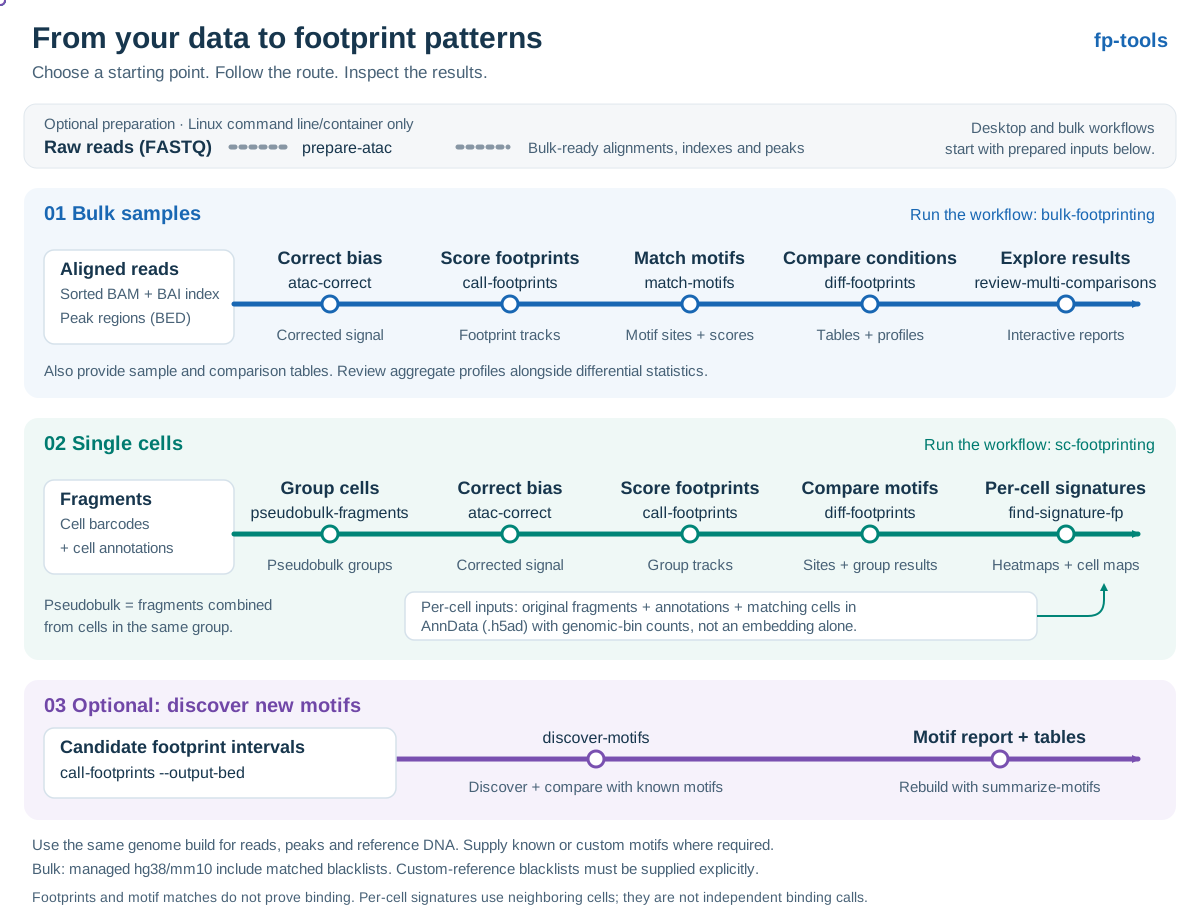
Open full-size map · View static map
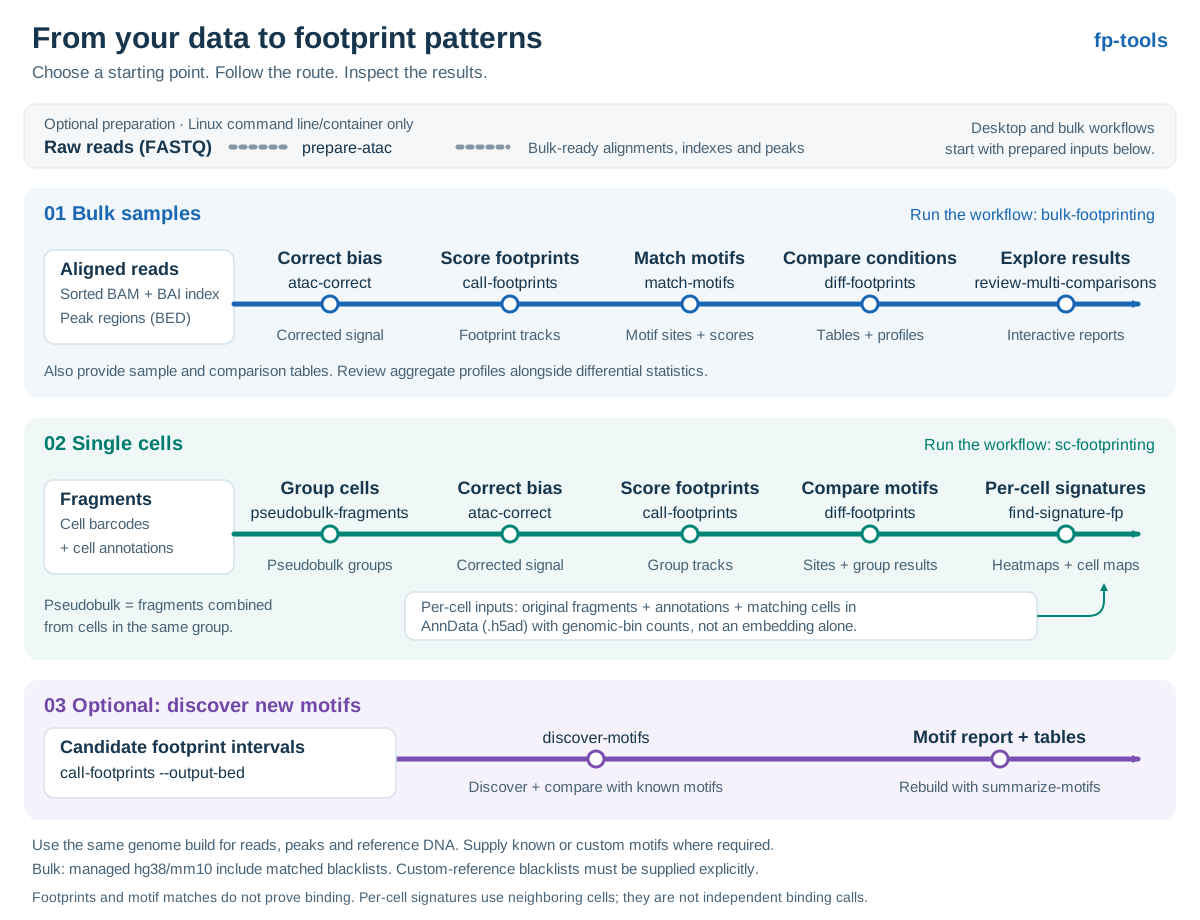
- Bulk samples: start with sorted alignments, indexes and peak regions;
bulk-footprintingruns correction, footprint scoring, motif matching and comparison reports. - Single cells: start with fragments, cell annotations and matching genomic-bin
counts;
sc-footprintingcombines cells into groups, analyzes their footprints and maps signatures back to individual cells. - New motifs: export candidate footprint intervals, then use the optional motif discovery workflow to find enriched motifs and compare them with known motifs.
The map shows the main routes; each analysis command is also available directly.
For targeted aggregate figures from existing motif results, use
plot-aggregate.
Choose one route:
| Route | Best for | Start |
|---|---|---|
| Desktop app | Windows or Apple Silicon macOS | Download |
| Python package | Windows, macOS, or Linux with Python 3.11–3.13 | python -m pip install fp-tools-bio |
| Container | Versioned analysis environment | docker build -t fp-tools:0.2.9 https://github.com/oncologylab/fp-tools.git#v0.2.9 |
Python package example:
python -m pip install --upgrade fp-tools-bio
bulk-footprinting --help
To open the browser interface, run fp-tools-gui. See the
installation guide
for desktop setup and remote-server instructions. Optional de novo motif tools
are downloaded automatically on first use.
bulk-footprinting runs from coordinate-sorted BAM/BAI files and matching peak
BED files through the final interactive comparison report.
Prepare samples.tsv with one row per biological sample and the columns
sample, condition, bam, and peaks. In comparisons.tsv, use comparison,
cond1, and cond2 to name each comparison and its two conditions. The
bulk workflow guide
provides minimal tables and explains the required inputs.
bulk-footprinting \
  --sample-table samples.tsv \
  --comparison-table comparisons.tsv \
  --genome hg38 \
  --outdir project
The workflow uses all available cores by default. Stage progress and command messages appear live in your terminal and are also saved in the project logs.
The hg38 and mm10 labels use checksum-verified FASTA and blacklist files
from the managed reference cache. A custom FASTA path and optional custom
blacklist can be supplied instead. The workflow runs atac-correct,
call-footprints, match-motifs,
diff-footprints, and review-multi-comparisons. Each command can also be run
directly. diff-footprints --comparison-axis regions compares matched genomic
region sets within one sample or across biological replicates.
Optional FASTQ-to-BAM preparation is a separate prepare-atac command on the
Linux CLI and in the Linux container. bulk-footprinting, the GUI, and native
macOS/Windows installations start from BAM/BAI and peak BED files.
sc-footprinting groups fragments, runs pseudobulk footprinting, and produces
per-cell k-nearest-neighbor (KNN) footprint-signature heatmaps and uniform manifold
approximation and projection (UMAP) views of cells.
The single-cell workflow guide provides a complete small real-data example and explains the annotation columns and AnnData count matrix required for this command. The command below is a template: replace the paths with your matched files and run from their folder.
sc-footprinting \
  --fragments fragments.tsv.gz \
  --annotations cell_annotations.tsv \
  --h5ad genomic_bin_counts.h5ad \
  --group-by cell_type \
  --genome-sizes hg38.chrom.sizes \
  --genome hg38.fa.gz \
  --peaks merged_peaks.bed \
--outdir project/single_cell| Area | Commands |
|---|---|
| Core analysis | atac-correct, call-footprints, match-motifs, diff-footprints, normalize-bigwig |
| Linux preprocessing | prepare-atac |
| Workflows | bulk-footprinting, sc-footprinting, run-yaml-workflow, fp-tools-gui, fp-tools-runtime |
| Reports | plot-aggregate, review-multi-comparisons |
| De novo motifs | discover-motifs, summarize-motifs |
| Single-cell utilities | pseudobulk-fragments, find-signature-fp |
Use <command> --help for complete options. Practical examples and the command
reference are available in the documentation.