
This started being a striped version of lock-in+PID project. Now it incorporated some new features that make it another App.
It is an application for the Red Pitaya STEMlab 125-14 board (RP): a set of instruments built in the FPGA (oscilloscope, harmonic lock-in amplifier, two PIDs, ramp generator and automatic lock control) to measure a system with modulation techniques and stabilize it with a feedback loop, controlled from a web page or remotely over HTTP.
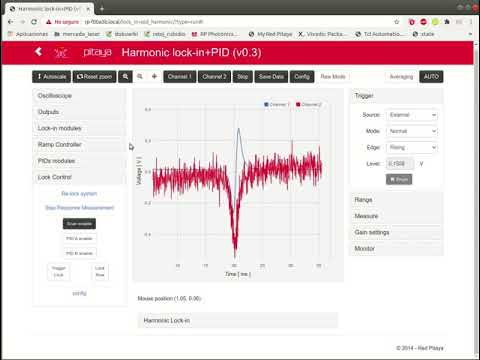

Current version: 2.3.32 (branch master; package archive/lock_in+pid_harmonic-2.3.32-74-devbuild).
This version is based on the 0.3.x series (v0.3.11), but with the FPGA design built in Vivado 2020.1,
using the project structure of RedPitaya-FPGA.
It is intended for the Red Pitaya Ecosystem 2.0 (e.g. RedPitaya_OS_2.04; tested on 2.04-35).
Since 2026-10-15 the branch master holds the 2.x series; the 0.3.x series (FPGA with Vivado 2015.2), for the
0.9x / 1.0 ecosystems, stays in the tags v0.3 .. v0.3.11.
- Web interface and C controller: those of v0.3.11 plus the Ecosystem 2.0 changes of v2.3.10 and the fixes of v2.3.12 to v2.3.32 (see CHANGELOG) (still built with Vivado 2015.2 SDK + Linaro toolchain).
- FPGA: ported to Vivado 2020.1 (see Building), oscilloscope of the Ecosystem 2.0 with the decimation widened to 20 bits (time ranges up to ~68 s).
- v2.3.13: the lock control runs entirely in the FPGA.
lock_control(0x18) is command + configuration and is never rewritten; the read-onlylock_status(0x1C, replaceslock_feedback) gives armed / locked / effective enables / lock count. A lock can be closed from Python writing only registers (py/lock_from_registers.py). See lock_in+pid_harmonic/doc/lock_control.md. - v2.3.14: Capture Lock (each lock request from the page captures the closing of the loop in the scope, triggered by the lock event, and freezes it until Auto / Single) and Fire on click (a click with Choose from graph sets the value and fires Trigger Lock). See lock_in+pid_harmonic/doc/lock_capture.md.
- v2.3.15: HTTP remote control on Ecosystem 2.0 (
/oscacquisitions with the newTrgUnlockregister;control_finn.pywith PID, ramp, lock-in and lock helpers), lock time trigger of 32 bits (up to 34.36 s), register ranges matching the FPGA. - v2.3.16:
control_finn.pystops the scope of the web page before acquiring (scope_stop()/scope_auto(), minimalPOST /data); the Time trigger / Level trigger fields accept units (16.58 ms,20 s,0.1 V); an emptied field is no longer sent as 0. - v2.3.17: exact bus reads of fast signals (
in1,oscA: ~2-3 % of the reads were corrupt), Config → load applies the time window in the right units,control_finn.pyresolves the host name once. - v2.3.18: minor fixes (same FPGA): lock trigger registers written from Python shown and kept by the page,
Single mode keeps a slow poll, Config → load without read-only keys, X+ up to 68.7 s, streaming processes
without the fds of nginx and with a higher priority,
lock_from_registers.py --timeclamped. See doc/Remote.md for the remote control and a known issue of the Ecosystem (POST /data). - v2.3.19: FPGA timing almost closed (WNS −8.954 → −1.099 ns) with pipeline registers in the lock-in, PIDs, generator and outputs: the lock-in outputs come 16 ns later, the PID outputs and the DAC outputs 8 ns later each (LOCK MODE loop +32 ns); same behaviour otherwise. See lock_in+pid_harmonic/doc/lock_latency.md.
- v2.3.20: the references reach the lock-in 1 clock later (compensation of the output register of v2.3.19): the phase measured through DAC → system → ADC is again the one of v2.3.18 (WNS −0.888 ns).
- v2.3.21: Reset zoom sets the scope to one period of the ramp (Ext Trig = Scan floor / Scan ceil), one period of the modulation (Ext Trig = harmonic mod.) or one whole memory at the current Dec (otherwise), and Y to −1 … 1 V (raw mode −8192 … 8192); during a lock capture it first ends it (as AUTO). Raw Mode rescales Y the same way.
- v2.3.22: mouse wheel on the scope: no key zooms both axes, SHIFT only the time axis (cursor ↔), ALT only the Y axes (cursor ↕); time window kept within 20 ns … 68.7 s; during a lock capture the zoom stays in the page.
- v2.3.23: slow scans (windows ≥ 1.5 s, e.g. a 30 s ramp): the scope trace never mixes samples of an older lap of its memory; Capture Lock works with Time, Level and Lock Now (the lock request is applied once the scope has its history before the lock); the capture is drawn while it is acquired and "LOCKED but not captured" only appears if the scope really missed it; Reset zoom on a slow scan uses 0.98 × the period so that every scan is acquired; (FPGA) a time trigger armed after the ramp was stopped (e.g. right after releasing a lock) waits for the next scan floor instead of firing in the middle of the scan.
- v2.3.24: scope presets below Ext Trig:
in1|in2,in1|ctrl,X|Y,in1|err,ctrl|errandusr(a pair of the user: double click to choose it; saved in the browser and in the configs). They change only OscA/OscB (not the zoom nor the trigger). Picking an Ext Trig other than None sets the Trigger panel to External + Normal. - v2.3.25: choosing Mode = Single in the trigger select during a long acquisition (e.g. a 30 s scan) completes the trace already being acquired (before, it stayed cut where it was); "Square mod." (not implemented) is no longer in the Ext Trig menu.
- v2.3.26: Auto waits for the trigger (Ext Trig or the level of a channel) and forces an acquisition only if none comes within max(0.25 s, 1.1 × window, 1.1 × period of the Ext Trig when known) + 50 ms: with Ext Trig = Scan floor t = 0 is the scan floor in Auto too (before, Auto triggered at once, at any phase of the scan). Also: the option Don't turn on PIDs and Ramp on config loading (Config dialog) is now unchecked by default: Config → load / Load file (and the restore after a Restart) bring back the ramp (Scan enable) and the PIDs as saved, so a config saved while scanning loads scanning. Checking it keeps the previous protection.
- v2.3.27: Config dialog: Load last config on init (checked by default, saved in the browser): the App opens with the last settings used in this browser (also in a new tab); unchecked, it opens with its defaults. Buttons Load last config and Reset to defaults restart the App with them. The Lock Control panel is now right below Outputs.
- v2.3.28: Lock Control: three small buttons time / level / time+level between Trigger Lock and Lock Now: one click on a button and one on the graph set the trigger type and value and fire Trigger Lock. Fixed: a click with Choose from graph + Fire on click during a POST in flight lost the new values or the re-lock.
- v2.3.29: Raw Mode: the Level of the scope trigger is in ADC counts (field, slider, line; −8192 … 8191) and the controller writes those counts to the scope (it took them as volts: Normal / Single never triggered for a level other than 0); AUTO in Raw Mode with its Y range in counts (it was clipped to ±1000).
- v2.3.30: AUTO puts the trigger level at the middle of the signal also with a calibration offset of the input (in volts it was one offset off: above in its search, below in the level it left) or a calibrated full scale other than 1 V (level and Y range were scaled by 1 / full scale); in Raw Mode it gives a whole count and half counts are rounded as the page shows them (−2.5 was shown as −2 and written as −3).
- v2.3.31: Ramp Controller of lock_in+pid_plus 2.2.0 (web page only): tabs period / freq (Frequency in Hz with
the nearest reachable value, Amp. p-p / Offset), Ramp period in s / ms (whole period), Lock osc. screen (scope
locked on the ramp: rising half of a triangle, the time zoom sets the ramp limits), Reset zoom alternating whole
period / rising half (Scan floor, triangle), no stale Force X of
GET /data; the four ramp checkboxes in two columns, no "-0 mV" labels. Same FPGA and C sources as v2.3.30; tested on RP2. See doc/Usage.md and doc/App.md. - v2.3.32: no lost 2nd click of Reset zoom when the POST of the 1st one is retried after a timeout (nginx hang): the answer of that POST no longer brings back the old window (Force X); a value changed back during a slow POST is no longer lost; the page checks that the server took the window it sent and sends it again if not. Web page only; tested on RP2 (PASS). See doc/Structure.md.

- Lock-in amplifier
- in-phase and quadrature Demodulation
- Demodulation for arbitrary phase
- Demodulatión for double and triple frequency
- Harmonic modulation from 3 Hz to 49.6 kHz, added to the outputs
- Two PID filters, for loop back stabilization
- Ramp/Scan controller for response analysis, set by period or by frequency / amplitude / offset, with a Lock osc. screen mode that turns a zoom of the scope into new scan limits
- Lock control for automatic scan-stop / PID start (time, level or immediate trigger, run by the FPGA)
- Two-channel oscilloscope on any internal signal, triggered by internal events (scan floor, lock, ...)
- Streaming system for continued acquisition of two channels
- Remote control through HTTP API
New Interface for lock-in R & Phase :
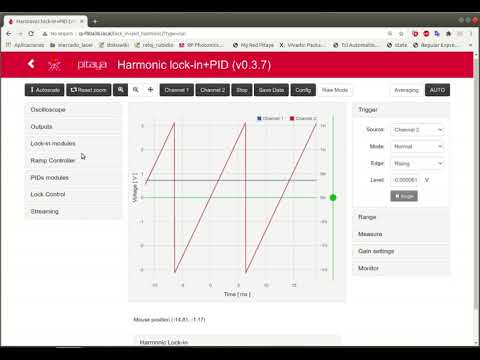
More decimaion values
| dec | max oscilloscope lenght |
|---|---|
| 1 | 0.131072 ms |
| 8 | 1.048576 ms |
| 64 | 8.388608 ms |
| 128 | 16.777216 ms |
| 256 | 33.554432 ms |
| 512 | 67.108864 ms |
| 1024 | 134.217728 ms |
| 8192 | 1.073741824 s |
| 65536 | 8.589934592 s |
| 524288 | 68.719476736 s |
| Document | Contents |
|---|---|
| doc/App.md | Instruments and technical data |
| doc/Usage.md | Web interface and procedures (scan, lock-in, lock), with screenshots |
| doc/Structure.md | Web page ↔ server ↔ FPGA, block diagrams |
| doc/FPGA.md | Register map |
| doc/Remote.md | Remote control over HTTP, Python examples |
| doc/Devel.md | Building, modifying and testing |
| CHANGELOG.md | Changes by version |
The concepts of the instruments are also explained in the documentation of the original App: https://marceluda.github.io/rp_lock-in_pid/
If you have a RP board you can install the Lock-in+PID application
by copying the lock_in+pid_harmonic folder (that comes with this tar/zip file) to the
/opt/redpitaya/www/apps folder (inside the RP).
The packages are built in archive/ (lock_in+pid_harmonic-<version>-<build>-devbuild.{zip,tar.gz}).
UnZip / UnTar the package and execute from terminal:
./upload_app.sh rp-XXXXXX.localReplace rp-XXXXXX.local by your RP localname or IP address. Also, you can use your own SSH client and
upload the lock_in+pid_harmonic folder to the RedPitaya folder /opt/redpitaya/www/apps (file system in
read-write mode, fpga.sh executable). Then open http://rp-XXXXXX.local/lock_in+pid_harmonic/.
For more information about installing procedure, refer to: https://marceluda.github.io/rp_lock-in_pid/TheApp/install/ and doc/Devel.md.
To build or modify the App you need a linux development environment with:
- Vivado 2015.2 (environment of the C controller / web App build)
- gcc-linaro-4.9-2015.02-3-x86_64_arm-linux-gnueabihf (installed on
/opt/linaro/gcc-linaro-4.9-2015.02-3-x86_64_arm-linux-gnueabihf/) - Vivado 2020.1 (for the FPGA design, since version 2.3.10), in
/tools/Xilinx/Vivado/2020.1
The App was based on code from project: https://github.com/RedPitaya/RedPitaya/tree/release-v0.95/apps-free/scope
Run on terminal:
source settings.sh
LANG=C make          # controller, c/ tools, FPGA (if changed) and packages in archive/
Parts (from the root folder):
make -C lock_in+pid_harmonic app        # C controller + c/ tools (cross compiled)
make -C lock_in+pid_harmonic c_tools    # only the c/ tools (lock, osc, streaming)
make -C lock_in+pid_harmonic fpga       # FPGA with Vivado 2020.1 (red_pitaya.bit, fpga.bit.bin)
make clean                              # clean all (also: clean_app, clean_fpga in lock_in+pid_harmonic)
The FPGA can also be built from lock_in+pid_harmonic/fpga (make, make project, make clean); its
Makefile loads Vivado 2020.1 by itself. Requirements, all the targets, tests and details:
doc/Devel.md.
GPL-3.0 (see LICENSE). If you use this software, please cite it (see CITATION.cff): M. A. Luda, doi 10.1063/1.5080345.