
Auto-resume Claude Code in the VS Code panel when your usage limit resets — while you sleep.


You're deep in a task and Claude Code stops:
You've hit your session limit · resets 3:30am (America/Los_Angeles)
It's midnight. The limit lifts at 3:30am. Nobody's awake to type "continue" — so six hours evaporate. claude-wake waits for the reset, re-focuses that exact panel, and submits a resume message for you. You wake up to finished work.
There are two ways to run it: a menu-bar app or a CLI — same engine,
same ~/.claude-wake state, so pick whichever you like.
Open a Claude Code session (anywhere) and paste this. It clones, installs, and enables claude-wake for you, then walks you through the one‑time permission:
Set up "claude-wake" for me — it auto-resumes my Claude Code (VS Code panel)
when my usage limit resets. Steps:

1. Clone https://github.com/kazuki-sf/claude-wake into ~/GitHub/claude-wake
   (if it already exists, cd in and `git pull` instead).
2. It's a zero-dependency Node CLI (needs Node 18+). Install it globally:
   `cd ~/GitHub/claude-wake && npm install -g .`
   If a global npm install is blocked, symlink it instead:
   `mkdir -p ~/.local/bin && ln -sf ~/GitHub/claude-wake/bin/claude-wake.js ~/.local/bin/claude-wake && chmod +x ~/GitHub/claude-wake/bin/claude-wake.js`
   (make sure ~/.local/bin is on PATH).
3. Enable auto-resume at login: `claude-wake install`.
4. Run `claude-wake doctor` and follow it to grant macOS Accessibility to the
   KeySender.app it points to (one-time — required so it can paste into the panel).
5. Confirm end-to-end with `claude-wake test` (pastes a harmless test message
   into my most recent Claude Code panel), then show me `claude-wake status`.
6. Ask me whether I also want the **menu-bar app** — a GUI dashboard with a live
   countdown to the next resume, pause/resume, and message editing. If yes and
   the Rust toolchain (`cargo`) is available, build it:
   `cd app/src-tauri && cargo install tauri-cli --version '^2' --locked && cargo tauri build`,
   then move the produced `.app` to ~/Applications and open it (it shares the
   same daemon, so nothing double-runs). If Rust isn't installed, point me to
   https://rustup.rs or let me skip it — the CLI already handles auto-resume.
   If I say no, skip this step.

Don't commit anything or modify my repos — everything lives under ~/.claude-wake.
Then tell me it's running and that it'll resume a limited panel shortly after
the limit resets.
What this changes on your machine: it registers a login item (the background watcher) and asks for a one-time macOS Accessibility grant to a dedicated
KeySender.app(so it can paste into the panel). Everything lives under~/.claude-wake; remove it any time withclaude-wake uninstall.
Prefer a GUI? After the CLI is set up, the menu-bar app is an optional build — see The menu-bar app.
npm install -g claude-wakeOr from source:
git clone https://github.com/kazuki-sf/claude-wake ~/GitHub/claude-wake
cd ~/GitHub/claude-wake
npm install -g .          # zero dependencies; needs Node 18+
claude-wake install       # start on login
claude-wake doctor # verify + grant Accessibility (guided)A small tray/menu-bar dashboard (Tauri: Rust + plain HTML, no npm frontend). Build it from source — needs the Rust toolchain:
cd ~/GitHub/claude-wake/app/src-tauri
cargo install tauri-cli --version '^2' --locked   # once
cargo tauri build                                 # → target/release/bundle/…
That produces a .app (macOS). It's unsigned (OSS) — first launch: right-click
→ Open. The app bundles the engine and shares ~/.claude-wake with the CLI, so
don't run two watchers — use the app or the CLI daemon, not both. See
app/README.md.
Pasting into the panel needs the Accessibility permission. claude-wake
compiles a tiny dedicated KeySender.app on your machine so you grant it to
one app only — not your terminal, not Node. claude-wake doctor opens the
right settings pane and shows exactly what to add:
System Settings → Privacy & Security → Accessibility → add & enable
~/.claude-wake/KeySender.app
- Detect — Claude Code writes each session's transcript to
~/.claude/projects/**/*.jsonl. A usage limit is a structured entry whose text carries the reset time with timezone. claude-wake tails these files (cheap append-only reads) — no screen scraping. - Focus — at reset time it opens
vscode://anthropic.claude-code/open?session=<id>, which brings the exact panel to the front, even with many panels open. - Send — the panel's input ignores fake keystrokes but accepts a paste, so it puts the message on the clipboard and does paste + Enter — only after confirming your editor is frontmost.
It fires once per limit (duplicate events are de-duplicated), and if you already resumed manually, it notices and skips. The default message is deliberately safe if it fires when it didn't need to:
"If you were stopped by a usage or token limit, continue from exactly where you left off. If you were not stopped, or the task is already complete, ignore this message."
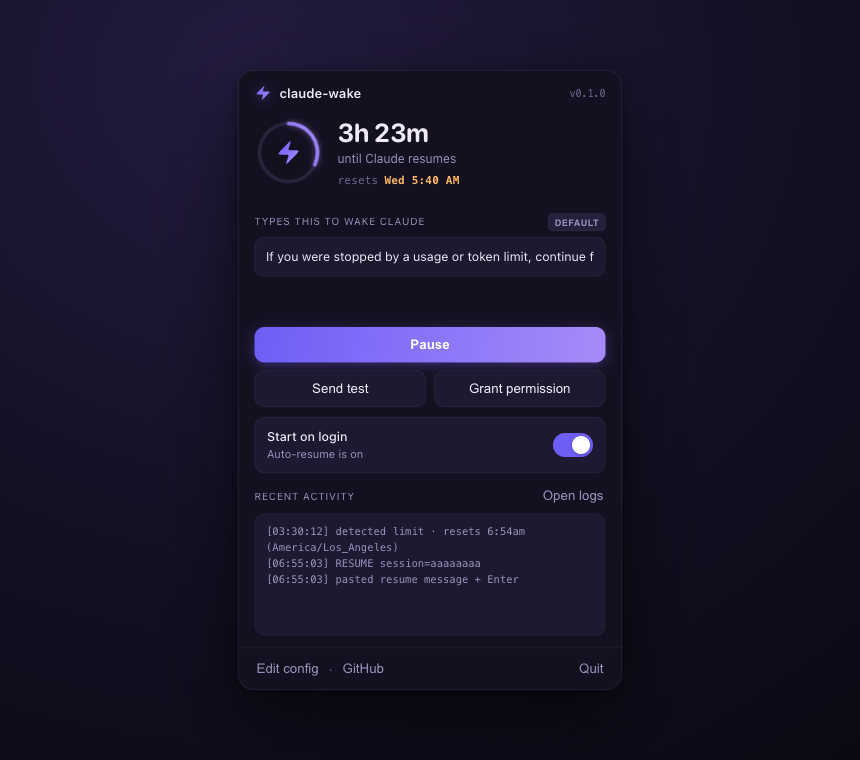
Menu-bar app — click the ⚡ icon to open the popover:
- Live countdown to the next resume, current state (Watching / Paused / Not enabled), and recent activity.
- Edit the resume message (applies live), Pause/Resume, Send test, Grant permission, Start on login, open logs/config, GitHub, Quit.
CLI:
| Command | What it does |
|---|---|
claude-wake watch |
Watch and auto-resume in the foreground (--dry-run to log only). |
claude-wake install |
Start on login (launchd / systemd / Startup) and run now. |
claude-wake uninstall |
Stop and remove the login service. |
claude-wake status |
Daemon state + scheduled resumes (--json for machines). |
claude-wake pause / resume |
Suspend / un-suspend auto-resume. |
claude-wake doctor |
Check dependencies + permissions, with fixes. |
claude-wake test |
Fire a harmless test message into your latest session now. |
claude-wake set-message "…" |
Set the resume message (blank resets to default). |
claude-wake logs [-f] |
Recent log lines (-f to follow). |
Optional ~/.claude-wake/config.json (the app edits message for you):
Invalid values fall back to safe defaults. Config changes apply live.
| Platform | Status |
|---|---|
| macOS | ✅ Reference — verified end-to-end. |
| Linux (X11) | 🧪 Implemented (xdotool + xclip/xsel). Community-verify. |
| Linux (Wayland) | 🧪 Experimental; blind send, needs allowUnverifiedPaste. |
| Windows | 🧪 Implemented (PowerShell SendKeys). Community-verify. |
Zero runtime dependencies, no network, no eval. The text it pastes is always
your static message — never derived from transcript or web content, so
summarizing a malicious page can't make it paste anything. Keystrokes go only
after verifying the editor is frontmost. Full trust model in
SECURITY.md; design in docs/design.md.
claude-wake uninstall # stop + remove the login service
npm rm -g claude-wake # (or: rm ~/.local/bin/claude-wake)
rm -rf ~/.claude-wake # state, logs, KeySender.app
# macOS: also remove KeySender from System Settings → Accessibility
# app: drag claude-wake.app to the TrashThis is a personal tool, shared as-is. It's built and verified for my own setup (macOS, the VS Code extension panel), and I may not review issues or pull requests. You're very welcome to fork it and adapt it to yours. If it's useful, a ⭐ is always appreciated.
MIT © Kazuki Nakayashiki
{
  "message": "Continue from where you left off.", // resume text (one line)
  "editor": "vscode",         // vscode | vscode-insiders | cursor | windsurf
  "marginSeconds": 60,        // extra wait after the printed reset time
  "pollSeconds": 20,          // transcript scan interval
  "focusDelayMs": 2500,       // wait between opening the panel and pasting
  "skipIfResumed": true,      // skip if you already continued manually
  "allowUnverifiedPaste": false // Wayland only — see Platform support
}