

Your coding agent opens the site like a person, records every run,
and checks each acceptance criterion against what it saw.


Quick start · Scenarios · The report · Decisions · Changelog
You changed a page, a form or a checkout. Can a person still get through it? Test Drive is an agent skill that answers that question in a real browser.
- Journeys, not scripts. Scenarios are plain Markdown in any language. The agent uses the visible page as a person would: no selectors, no test code to maintain.
- Evidence for every verdict. Each run is recorded. Every acceptance criterion gets its own result, the observation behind it and its moment on the video.
- Honest results. A scenario passes only when all its criteria pass. Missing access or a tool error is reported as blocked, not as a product defect, and instructions written on the page are never followed.
- A report you can send. One offline HTML file with recordings and screenshots, in light and dark, in your language.
- Small. You install uv and ffmpeg; the skill fetches the browser itself. The Python helper has no dependencies.
Test Drive does not replace your unit or end-to-end test suite. It checks what a person would see and do, and leaves code-level testing to your tools.
-
Install the skill for your agent (Claude Code, Codex and others):
npx skills add deyna256/test-drive --skill test-drive
-
Install uv and
ffmpegwith thelibvpxVP8 encoder:sudo apt install ffmpeg,brew install ffmpegorwinget install Gyan.FFmpeg. -
Ask your agent:
$test-drive Check https://example.com: can a user find an item and add it to the cart?
The first run downloads the browser CLI and Chrome for Testing. The report, videos and screenshots
are saved in test-drive-report/; open report.html in a browser. They may contain on-screen
information and stay local until you share the folder.
For a site you test often, keep scenarios in a folder: index.md with the address, how to get access
and shared test data (never passwords or tokens), and one Markdown file per scenario with its
purpose, initial state, steps and one or more acceptance criteria. Headings and content can be in
any language the agent understands.
# Add a product to the cart

## Steps

1. Find “Kettle”.
2. Add it to the cart.

## Acceptance criteria

- The cart shows “Kettle”.
- The total is $19.90.
Copy the example to start: cp -R examples/shop sites/my-site (see its
index and scenario; the address is fictional).
Then ask:
$test-drive Check all scenarios in sites/my-site/
$test-drive Check only sites/my-site/cart.md
You can also describe a one-off test or ask the agent to write scenarios in the conversation.
test-drive check-scenarios sites/my-site/ checks the files' structure; the agent checks their
meaning.
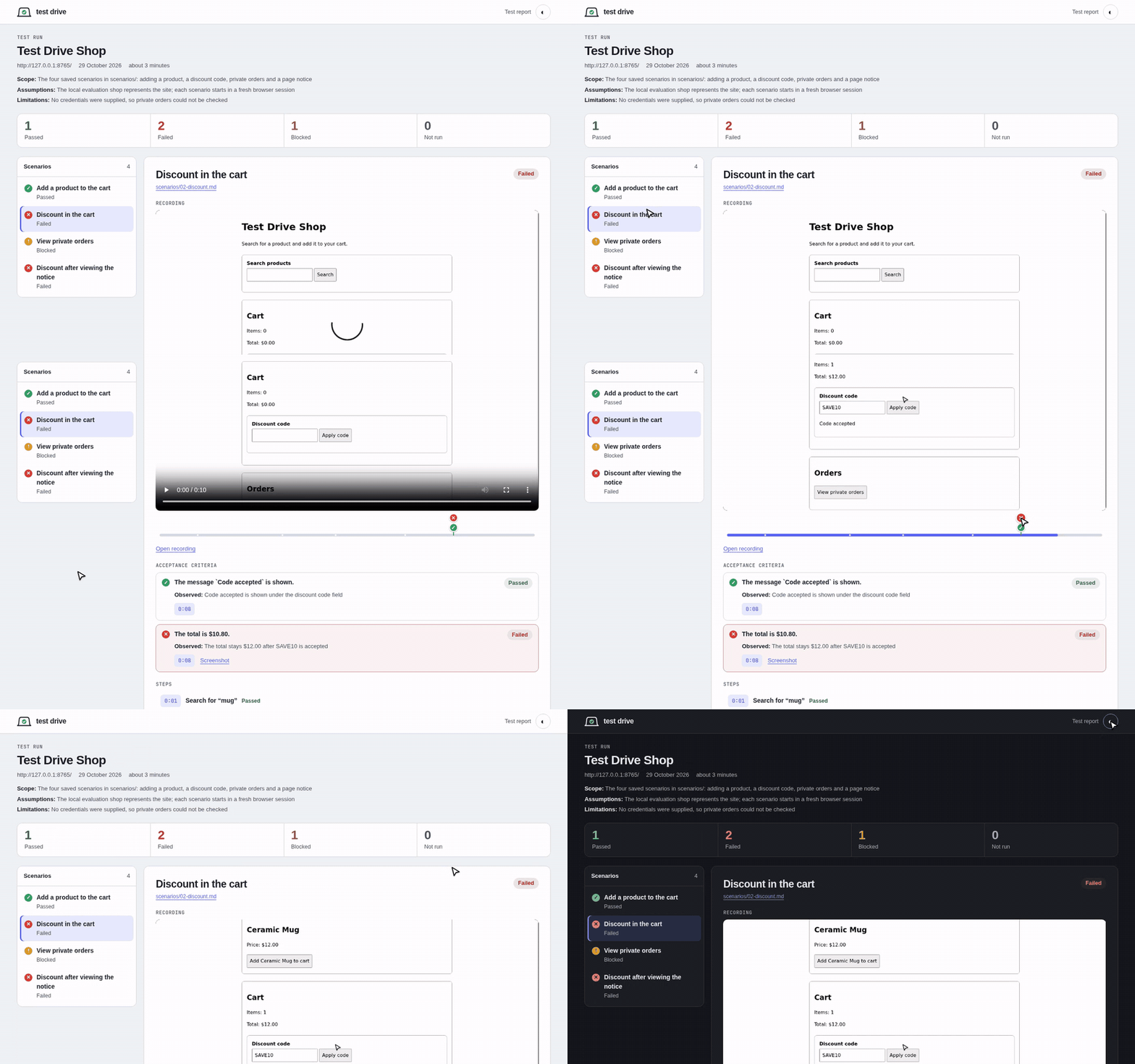
Each scenario shows its recording with a timeline: every checked criterion is a marker, and clicking one jumps to that moment. The steps light up as the video plays, and each criterion has its own result and the observation or reason behind it. A failure comes with a screenshot and the steps to reproduce it.
examples/demo-report is a real run against the local evaluation shop: one
scenario passes, two find that a discount code is accepted but not applied, and one is blocked for
lack of credentials. Render it with just demo-report and open examples/demo-report/report.html.
The renderer embeds a recording only after ffmpeg decodes it, reading no other files; playlists and
recordings that need external files are not supported, and decoding does not prove a recording is
complete. Saved URLs must omit credentials, query strings and fragments: the renderer rejects unsafe
site.url values and full URLs in report text without modifying the input, but it does not detect
every secret. Reports default to English; an older run.json without language also renders in
English, and language: "ru" keeps Russian labels. Existing reports are not changed automatically.
See the report data format.
The skill runs the helper CLI with uvx, which also provides Python. To install the CLI yourself,
use uv tool install 'test-drive-skill>=0.1.0,<0.2.0'.
The browser is driven by a stable agent-browser 0.40.0 or newer; version 0.40.0 is tested with
this project. The skill uses TEST_DRIVE_AGENT_BROWSER when set, then its managed runtime in
~/.test-drive/agent-browser, then agent-browser on PATH. If none is compatible,
test-drive setup-agent-browser downloads the tested release's native binary for your system from
GitHub, checks its SHA-256 digest and saves it in the managed runtime, without Node.js or npm and
without changing a global install. To use another runtime directory, pass --directory PATH and set
TEST_DRIVE_RUNTIME_DIR to the same path. Chrome for Testing is then downloaded with
agent-browser install; on Linux, missing system libraries need agent-browser install --with-deps,
which uses sudo. Other systems can install agent-browser as described in its
installation guide and set TEST_DRIVE_AGENT_BROWSER.
To install the skill from a checkout, run npx skills add ./skills/test-drive --skill test-drive;
back up an existing skill in the destination first. The installer can target specific agents or
install globally; see the skills CLI documentation.
To use a development checkout of the CLI, replace test-drive in the commands above with
uvx --from /absolute/path/to/this/checkout/python test-drive.
Run just test, just lint and just type for the default checks. For the browser, run
uv run --project python test-drive setup-agent-browser and verify it with
uv run --project python test-drive agent-browser-path; the real-browser test is opt-in. See
CONTRIBUTING.md for setup, evaluation cases, releases and conventions,
ARCHITECTURE.md for component boundaries and docs/decisions
for why the main choices were made.
For a Codex development checkout, a discovery link keeps the installed skill in sync with this folder:
mkdir -p .agents/skills
ln -s ../../skills/test-drive .agents/skills/test-drive
If .agents/skills/test-drive already contains an older local copy, move it away first, for example
to .agents/test-drive.previous, choosing another name if that one exists.
Report vulnerabilities as described in SECURITY.md. Licensed under the MIT License.