Read this in: 简体中文


- Why these skills
- How these skills work
- Find the right skill
- Install
- Use a skill
- Help and feedback
- Contributing
- License
According to the Cynefin Framework, problem contexts are divided into Clear, Complicated, Complex, and Chaotic domains. Software usually belongs to the latter two.
In the Complex or Chaotic domains, cause and effect are often unclear, and unpredictability outweighs predictability.
Progress therefore requires feedback loops of action, probing, sensing, and responding, with continuous exploration, experimentation, inspection, and adaptation. This moves the work into the emergent domain, where patterns can be discovered and order established.
These feedback-oriented practices have long shaped software development.
Current agentic methodologies, including SDD (spec-driven development), can overemphasize plans and specifications when evidence from real behavior is weak. This risks recreating the failure modes of waterfall development.
A plan is a hypothesis to be validated, not a promise to be implemented.
Software projects are complex systems. Requirements change, design decisions interact, and local improvements can create downstream costs. AI agents increase delivery speed, but they can also amplify a wrong assumption or an overcomplicated direction.
These skills provide reusable methods for four kinds of work: design under uncertainty, reliable execution, review and coherence, and project learning. They include specialized support for domain-centered design, game development, and Godot. See gda for more details.
The skills use systems thinking, complexity management, and fast feedback without replacing project rules or human judgment.
The four areas are entry points in a feedback loop, not mandatory sequential phases.
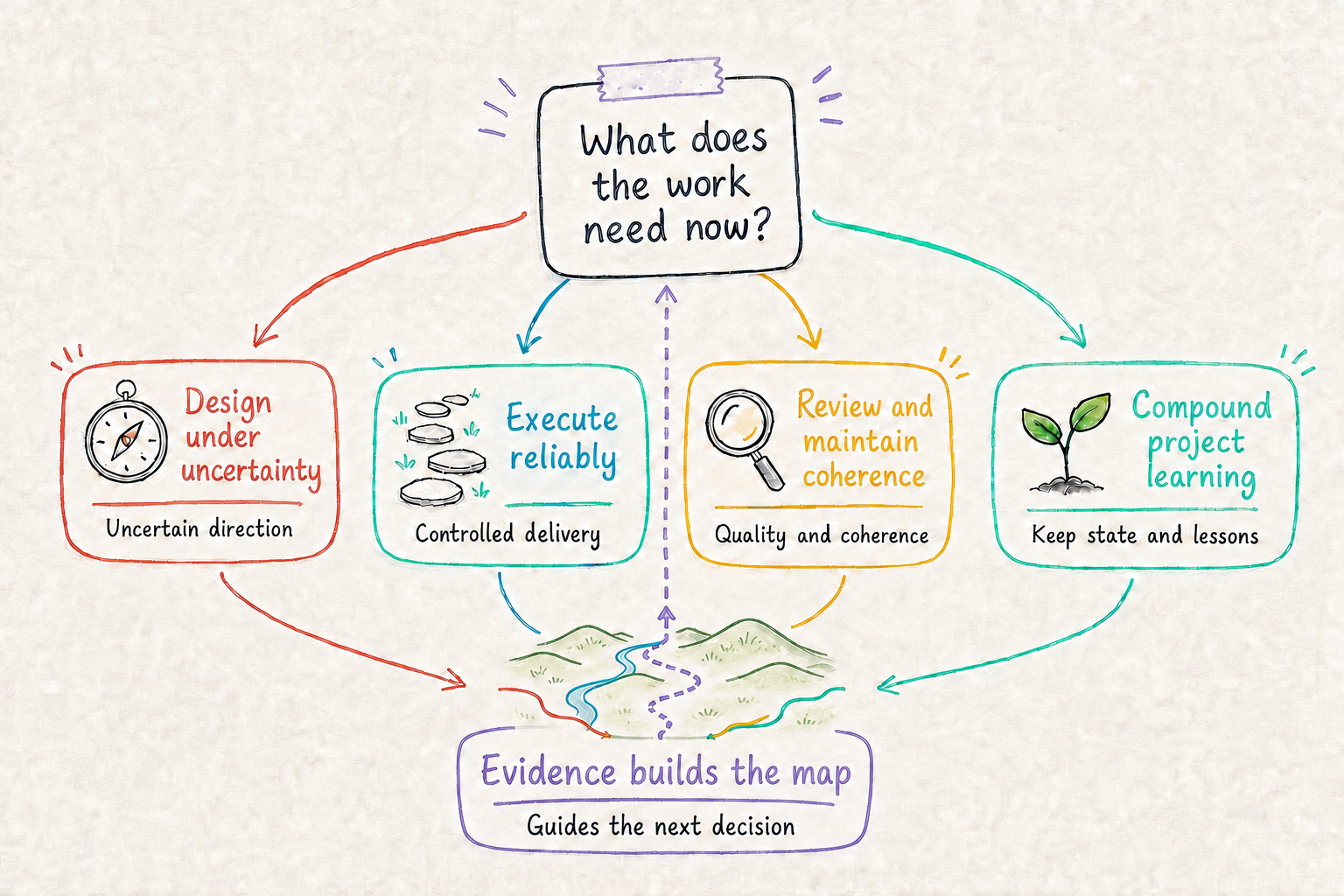
- Evidence before confidence. Test important assumptions before treating a direction as settled.
- Proportionate complexity. Add architecture, process, and safeguards only when their value matches the current risk.
- Fast feedback. Use small, observable checks to learn and adapt early.
- Clear authority. Keep ownership, terminology, decisions, and project artifacts aligned as the system changes.
Design under uncertainty
- What: Tests architecture direction against requirements and research, explores it with prototypes, uses it in real project work, and reconciles the results with project artifacts.
- Why: Important decisions often become expensive before their assumptions have been tested.
- When: Use it for novel, disputed, broad, or difficult-to-reverse decisions.
- How: Ask: “Use validation-driven-design to compare these deployment options, recommend the best-supported direction, and identify the remaining evidence gaps.”
- What: Turns a domain model and project constraints into module boundaries, ownership, dependencies, communication, and evolution paths.
- Why: Technical folder boundaries often hide coupling instead of reflecting the system's real responsibilities.
- When: Use it when structuring a system, assigning responsibilities, reviewing coupling, or planning incremental modularization.
- How: Ask: “Use design-domain-modular-architecture to propose boundaries for this domain and explain the dependency direction.”
- What: Designs Godot projects around Add-ons, Systems, Content, and UI with directed dependencies and clear ownership.
- Why: Scenes, scripts, resources, and UI can become tightly coupled as a game grows.
- When: Use it for a new Godot structure, a modularization plan, or a review of where game assets and behavior belong.
- How: Ask: “Use design-godot-modular-architecture to place these scenes and systems in a structure that can evolve safely.”
- What: Designs a small player-facing Godot playtest for one gameplay or balance
question, using maintained
gda-balancingmodel and experiment sources. It builds ondesign-godot-modular-architecture. - Why: CLI-only evidence does not test the intended in-game player experience.
- When: Use it when a gameplay or balance hypothesis defined in
gda-balancingneeds direct player feedback. It is not for general game development or a CLI-only tutorial. - How: Ask: “Use design-verifiable-playtest to turn this
gda-balancinghypothesis and its maintained sources into a focused playable experiment.”
Execute reliably
- What: Guides Blender MCP asset creation, inspection, and export for Godot, with gda import checks, detailed troubleshooting, and optional Python helpers.
- Why: A successful tool call does not establish that the intended asset was saved, imported, or rendered correctly.
- When: Use it for Blender-to-Godot asset production, handoff, or troubleshooting.
- How: Ask: “Use gda-blender-mcp to create this character through Blender MCP and verify its import and motion in Godot with gda.”
- What: Plans and orchestrates independent implementation slices in isolated Git worktrees, followed by ordered integration and validation.
- Why: Parallel work can move conflicts from implementation time to a risky, unplanned merge phase.
- When: Use it when several independent slices justify the coordination cost and parallel execution is authorized.
- How: Ask: “Use subagent-worktree-parallel to divide this work into independent slices and define a safe integration order.”
- What: Formulates a Conventional Commit message from the staged change and the target repository's own conventions.
- Why: A vague or inaccurate commit message weakens history and can trigger the wrong release effect.
- When: Use it when one atomic change is staged and ready to commit.
- How: Ask: “Use git-conventional-commits to inspect the staged change and create the precise commit message for it.”
Review and maintain coherence
- What: Reviews issues, ADRs, specifications, plans, and other project documents for correctness, requirement provenance and authority, explicit scope boundaries, usability, consistency, completeness, terminology, and prose.
- Why: A polished document can still turn a technical observation into an unsupported product commitment, drift from its originating requirement, omit a required decision, or give readers instructions they cannot use.
- When: Use it when you explicitly need a document review or a re-review of claimed fixes.
- How: Ask: “Use artifact-review to review this ADR against the implementation and its related decisions.”
- What: Reviews a skill's selection description, instructions, resources, terminology, and prose as one usable artifact.
- Why: A skill can pass structural checks while its trigger, workflow, or bundled material remains inaccurate or incomplete.
- When: Use it for a new or changed skill, a skill-focused pull request, or a re-review after fixes.
- How: Ask: “Use skill-review to verify that this skill can do its declared job with the smallest sufficient structure.”
- What: Reviews whether a design, plan, or implementation introduces complexity proportionate to the problem it solves.
- Why: Scope creep, premature generalization, and defensive mechanisms can make a solution harder to change before they deliver value.
- When: Use it when a proposal feels overengineered or when deciding whether a mechanism is worth adding, retaining, or expanding.
- How: Ask: “Use entropy-review to identify disproportionate complexity in this plan and propose a smaller reversible alternative.”
- What: Traces stalled work through requirements, assumptions, decisions, and patches, then uses first principles to reassess support scope and design boundaries.
- Why: Small fixes can preserve a wrong premise and increase total complexity without bringing the original task closer to acceptance.
- When: Use it when a feature or fix repeatedly fails to converge or supporting mechanisms keep growing without progress toward acceptance. Multiple iterations alone do not prove a design failure.
- How: Ask: “Use backtrace-review to investigate this repeated rework, validate the key assumptions, and recommend a proportionate recovery path.”
- What: Verifies review feedback against the current change, requirements, constraints, and runtime evidence before applying it.
- Why: A review can identify a real problem but overstate its impact or recommend the wrong mechanism.
- When: Use it when responding to pull request feedback or deciding whether to adopt, adapt, or decline a finding.
- How: Ask: “Use handle-review to evaluate these comments, implement verified fixes, and explain any finding we should not adopt as written.”
These skills share evidence but answer different primary questions. Use the smallest
review that matches the current problem, and route deeper work instead of repeating a
sibling skill's workflow. skill-review remains the specialized review for Skill
packages.
| Current need | Start with | Continue when needed |
|---|---|---|
| Review an issue, ADR, specification, or plan before implementation | artifact-review checks factual correctness, requirement provenance and authority, and explicit scope boundaries. |
Use entropy-review when the approved artifact proposes mechanisms or obligations whose proportionality needs deeper assessment. |
| Assess the complexity of a design, plan, or implementation | entropy-review compares total obligations with the current goal and minimum sufficient solution. |
Return to artifact-review when the source requirement or decision artifact is itself unclear or has drifted. |
| Evaluate pull request feedback | handle-review decides whether each finding is true, in scope, and appropriate to adopt. |
Use entropy-review for a disproportionate proposed mechanism, or backtrace-review when repeated review fixes expand the contract without acceptance progress. |
| Recover non-converging work | backtrace-review reconstructs the requirement, assumption, decision, and patch chain. |
Use artifact-review to review the recovered requirement or decision record, then entropy-review to assess the recovery design. |
After an accepted requirement, decision, scope, or term changes, use reconcile to
repair stale dependent artifacts. The skills can also be used independently when one
primary question is sufficient.
- What: Finds and repairs drift among tracked work, requirements, decision records, glossaries, tests, and other authoritative artifacts.
- Why: A changed decision can leave several individually plausible documents that no longer agree.
- When: Use it after a requirement, scope, decision, responsibility, or term changes.
- How: Ask: “Use reconcile to find every artifact affected by this decision change, restore one authoritative home for each affected fact, and update the references derived from those facts.”
Compound project learning
- What: Rewrites a short
STATE.mdwith the current milestone, completed work, reusable experience, next tasks, and unfinished backlog. - Why: The next session should continue from known state instead of rediscovering project progress and losing pending work.
- When: Use it at the end of a working session or before handing work to another agent.
- How: Ask: “Use state to record today's outcome, the next recommended task, and the unfinished work that must survive this session.”
- What: Uses a project-level
PITFALLS.mdto prevent repeated environment, tool, permission, sandbox, and invocation failures. - Why: Verified operational lessons are often lost, so later sessions repeat the same failed command or environment assumption.
- When: Use it before tool-heavy work, when a known pitfall may apply, or after confirming a reusable operational failure.
- How: Ask: “Use pitfalls before running the project tools, and record any new environment lesson only after it is verified.”
You need Node.js 22.20 or newer and npx.
Run the installer, then choose the skills that match your primary problem, the target agent, and the installation scope:
npx skills add aigengame/skillsInstall one skill directly, or make skills available across projects:
# Install one skill
npx skills add aigengame/skills --skill entropy-review

# Install across projects
npx skills add aigengame/skills --global
To install a known release, append its
release tag, such as
aigengame/skills#v0.1.0.
Skills do not update automatically. For an installation without a release tag,
run npx skills update. Add --project or --global to select the scope
directly. An installation from a release tag stays on that tag. Install a newer
tag to upgrade.
Start with what the work needs now. Choose the area that matches the primary problem, then name the skill and the outcome you need. Include the relevant evidence, constraints, and project decisions.
Use the How example in each skill entry as a starting point. If new evidence changes what the work needs, choose again. If your agent has a skill command or picker, you can use it instead of naming the skill in prose.
Use GitHub Issues for defects, usage questions, and proposals for reusable skills. Include the skill name, target agent, what you expected, and what happened.
Want to improve an existing skill or propose a reusable one? Read CONTRIBUTING.md for scope, validation, review, and release rules.
This repository is available under the MIT License.