Nume: Petrea Andrei
Grupă: 331CC
Pentru început, am completat ThreadPool-ul din cadrul fișierului task_runner.py, bazându-mă pe mecanismul din Figura 1.
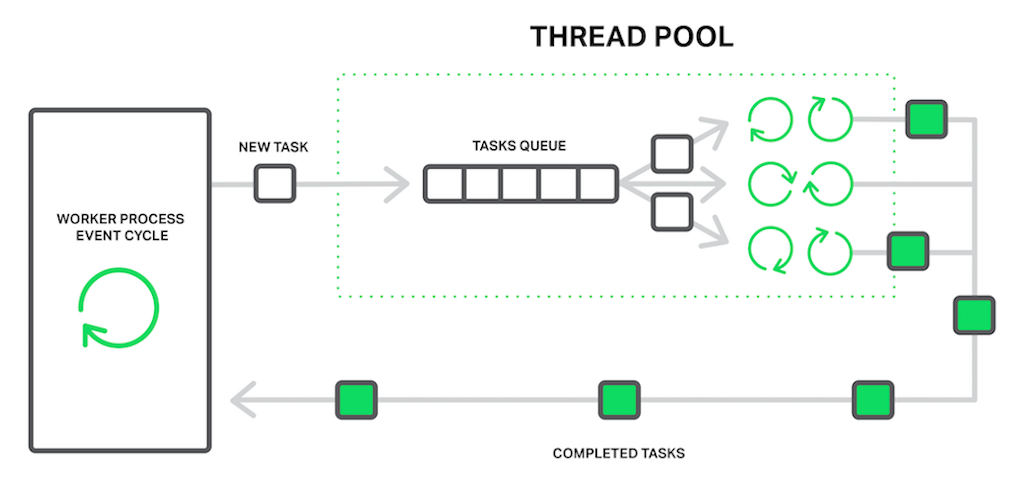
Pentru realizarea calculelor, am folosit șablonul de proiectare Strategy, definindu-mi astfel clasa Task, pentru incapsularea id-ului, tipului și datelor necesare pentru calcul.
class Task:
    def __init__(self, task_id, task_data, task_type, data_ingestor):
        self.task_id = task_id
        self.task_data = task_data
        self.task_type = task_type
        self.data_ingestor = data_ingestor

    def execute(self):
        return TaskStrategy.execute_task(self)
Pentru tipul de task, am definit un enum TaskType, care conține toate tipurile de task-uri posibile.
class TaskType(Enum):
    STATES_MEAN_REQUEST = 1
    STATE_MEAN_REQUEST = 2
    BEST5 = 3
    WORST5 = 4
    GLOBAL_MEAN_REQUEST = 5
    DIFF_FROM_MEAN_REQUEST = 6
    STATE_DIFF_FROM_MEAN_REQUEST = 7
    MEAN_BY_CATEGORY_REQUEST = 8
    STATE_MEAN_BY_CATEGORY_REQUEST = 9
Și am definit și clasa TaskStrategy, care execută task-urile în funcție de tipul acestora.
class TaskStrategy:
    @staticmethod
    def execute_task(task):
        # Dictionary to map the task type to the corresponding function
        strategy_functions = {
            TaskType.STATES_MEAN_REQUEST: TaskStrategy.states_mean_strategy,
            TaskType.STATE_MEAN_REQUEST: TaskStrategy.state_mean_strategy,
            TaskType.BEST5: TaskStrategy.best5_strategy,
            TaskType.WORST5: TaskStrategy.worst5_strategy,
            TaskType.GLOBAL_MEAN_REQUEST: TaskStrategy.global_mean_strategy,
            TaskType.DIFF_FROM_MEAN_REQUEST: TaskStrategy.diff_from_mean_strategy,
            TaskType.STATE_DIFF_FROM_MEAN_REQUEST: TaskStrategy.state_diff_from_mean_strategy,
            TaskType.MEAN_BY_CATEGORY_REQUEST: TaskStrategy.mean_by_category_strategy,
            TaskType.STATE_MEAN_BY_CATEGORY_REQUEST: TaskStrategy.state_mean_by_category_strategy
        }
        # Run the corresponding function based on the task type with the task's fields as arguments
        return strategy_functions[task.task_type](task.task_id, task.task_data, task.data_ingestor)
Pentru fiecare tip de task, am definit o metodă statică în cadrul clasei TaskStrategy, care primește ca argumente id-ul task-ului, datele necesare pentru calcul și obiectul DataIngestor, care conține datele din .csv, întrebările care au ca răspuns minimul și întrebarile care au ca răspuns maximul.
    @staticmethod
    def states_mean_strategy(id, data, data_ingestor):
        question = data['question']
        dataset, _, _ = data_ingestor.fields()
        # Pandas query to get the mean values of the question for each state
        mean_values = dataset[dataset['Question'] == question].groupby('LocationDesc')['Data_Value'].mean().sort_values().reset_index()
        # Convert the mean values to a dictionary
        result = mean_values.set_index('LocationDesc')['Data_Value'].to_dict()
        # Write the result to a json file
        with open(f'results/job_id_{id}.json', 'w') as f:
            json.dump(result, f)
        # Return the non-json result
        return result
Apoi am completat rutele din cadrul fisierului routes.py. Pentru fiecare cerere de tip POST, ruta arată în felul următor:
@webserver.route('/api/global_mean', methods=['POST'])
def global_mean_request():
    # TODO
    # Get request data
    # Register job. Don't wait for task to finish
    # Increment job_id counter
    # Return associated job_id
    # Check if method is POST
    if request.method != 'POST':
        return jsonify({"error": "Method not allowed"}), 405
    # Check if server is shutting down
    if webserver.shutdown_event.is_set():
        return jsonify({"error": "Server is shutting down"}), 503
    data = request.json
    # Increment job_counter atomically
    with webserver.job_counter_lock:
        webserver.job_counter += 1
        curr_job_id = webserver.job_counter
    # Add task to task queue
    webserver.tasks_runner.add_task(Task(curr_job_id, data, TaskType.GLOBAL_MEAN_REQUEST, webserver.data_ingestor))
    return jsonify({"job_id": f"job_id_{curr_job_id}"})
Ca să i-au rezultatul cererii, am completat metoda de tip GET din cadrul aceluiași fișier, get_response.
@webserver.route('/api/get_results/<job_id>', methods=['GET'])
def get_response(job_id):
    # TODO
    # Check if job_id is valid
    # Check if job_id is done and return the result
    #    res = res_for(job_id)
    #    return jsonify({
    #        'status': 'done',
    #        'data': res
    #    })
    # If not, return running status
    # Check if method is GET
    if request.method != 'GET':
        return jsonify({"error": "Method not allowed"}), 405
    # job_id is in format "job_id_{job_id}" and have to extract the number
    try:
        job_id = int(job_id.split('_')[-1])
    except ValueError:
        return jsonify({"status": "Invalid job_id"}), 402
    # Check if job_id is valid
    if 0 < job_id <= webserver.job_counter:
        # If the job_id is in results, then it's done and we can return the result
        if job_id in webserver.tasks_runner.results:
            # Get the result
            result = webserver.tasks_runner.get_result(job_id)
            # Remove the result from the results dictionary
            webserver.tasks_runner.remove_result(job_id)
            return jsonify({"status": "done", "data": result})
        # If the job_id is in results folder, then it's done and we can return the result
        if os.path.exists(f"results/job_id_{job_id}.json"):
            with open(f"results/job_id_{job_id}.json", "r") as fin:
                try:
                    data = json.load(fin)
                    return jsonify({"status": "done", "data": data})
                # The file exists but the server didn't finish writing the result
                except json.JSONDecodeError:
                    return jsonify({"status": "running"})
        # Else, the job is still running
        return jsonify({"status": "running"})
    return jsonify({"status": "Invalid job_id"}), 402
Pe partea de logging, am creat in init.py un logger care scrie într-un fișier webserver.log.
# Configure logging
logger = logging.getLogger(__name__)
# Create a file handler with a maximum file size of 10MB and 5 backups
handler = RotatingFileHandler('webserver.log', maxBytes=10000000, backupCount=5)
handler.setLevel(logging.INFO)
formatter = logging.Formatter('%(asctime)s - %(name)s - %(levelname)s - %(message)s')
formatter.converter = time.gmtime
handler.setFormatter(formatter)
logger.addHandler(handler)
logger.setLevel(logging.INFO)
și am creat metodele de logging per request folosind decoratorii before_request și after_request, detaliind informațiile utile despre cerere și răspuns.
# Log request and response data
@webserver.before_request
def log_request_info():
    webserver.logger.info(f'Request: {request.method} {request.url}')
    webserver.logger.info(f'Request Headers: {request.headers}')
    webserver.logger.info(f'Request Data: {request.get_data()}')

@webserver.after_request
def log_response_info(response):
    webserver.logger.info(f'Response: {response.status_code}')
    webserver.logger.info(f'Response Headers: {response.headers}')
    webserver.logger.info(f'Response Data: {response.get_data()}')
    return response
Pe partea de unit testing, am creat un fișier TestWebserver.py în care am testat corectitudinea calculului pentru fiecare tip de task. Mi-am creat o funcție ajutătoare test_task pe care o apelez cu argumentele în funcția de task-ul testat.
 # Helper function to test a task
    def test_task(self, job_id, task_type, input_file, result_file):
        # Load the input data
        with open(input_file, "r") as f:
            data = json.load(f)
        # Send the task to the webserver
        response = requests.post(f'{TestWebserver.URL}{TestWebserver.TASKS_ENPOINTS[task_type]}', json=data, timeout=5)
        # Check if the task was accepted
        self.assertEqual(response.status_code, 200)
        # Wait for the task to finish
        time.sleep(1)
        # Check if the results are ready
        response = requests.get(f'{TestWebserver.URL}/api/get_results/job_id_{job_id}', timeout=5)
        self.assertEqual(response.status_code, 200)
        # Check if the file was created
        self.assertTrue(os.path.exists(f"results/job_id_{job_id}.json"))
        # Load the results for the calculation
        with open(f"results/job_id_{job_id}.json", "r") as f:
            my_result = json.load(f)
        # Load the real results
        with open(result_file, "r") as f:
            real_result = json.load(f)
        # Check if the results have the same number of entries
        self.assertEqual(len(my_result), len(real_result))
        # Check if the entries are in the same order
        self.assertListEqual(list(my_result.keys()), list(real_result.keys()))
        # Check if the results are the same with a delta
        for key in my_result:
            self.assertAlmostEqual(my_result[key], real_result[key], delta=TestWebserver.EPSILON)

     # Test the states mean strategy
    def test_states_mean_strategy(self):
        # Choose a random input
        input_nr = random.randint(1,len(os.listdir("tests/states_mean/input")))
        self.test_task(1, TaskType.STATES_MEAN_REQUEST, f"tests/states_mean/input/in-{input_nr}.json", f"tests/states_mean/output/out-{input_nr}.json")
unde TestWebserver.URL este adresa serverului, TestWebserver.TASKS_ENPOINTS este un dicționar de task-uri - rute și TestWebserver.EPSILON este o valoare mică pentru a compara două numere reale.
    # Epsilon delta for real numbers comparison
    EPSILON = 0.01
    # URL of the webserver
    URL = "http://127.0.0.1:5000"
    # Endpoints of the tasks
    TASKS_ENPOINTS = {
        TaskType.STATES_MEAN_REQUEST: "/api/states_mean",
        TaskType.STATE_MEAN_REQUEST: "/api/state_mean",
        TaskType.BEST5: "/api/best5",
        TaskType.WORST5: "/api/worst5",
        TaskType.GLOBAL_MEAN_REQUEST: "/api/global_mean",
        TaskType.DIFF_FROM_MEAN_REQUEST: "/api/diff_from_mean",
        TaskType.STATE_DIFF_FROM_MEAN_REQUEST: "/api/state_diff_from_mean",
        TaskType.MEAN_BY_CATEGORY_REQUEST: "/api/mean_by_category",
        TaskType.STATE_MEAN_BY_CATEGORY_REQUEST: "/api/state_mean_by_category"
    }
Ca să testez, mi-am creat o suită de teste, pe care o rulez în cadrul metodei main.
# Create a test suite
def test_suite():
    suite = unittest.TestSuite()
    tests = [TestWebserver(f"test_{endpoint.split('/')[-1]}_strategy") for endpoint in TestWebserver.TASKS_ENPOINTS.values()]
    suite.addTests(tests)
    return suite


if __name__ == '__main__':
    try:
        # Clear the results folder
        os.system("rm -rf results/*")
        # Reset the counter
        requests.get(f'{TestWebserver.URL}/api/reset_counter', timeout=5)
        # Run the tests
        runner = unittest.TextTestRunner()
        runner.run(test_suite())
        print("TestWebserver.py: All tests ran successfully")
    finally:
        # Clean up + reset the counter
        os.system("rm -rf results/*")
        requests.get(f'{TestWebserver.URL}/api/reset_counter', timeout=5)
În opinia mea, consider că tema a fost utilă, deoarece am învățat să creez un backend care poate fi legat la un site web sau la o aplicație mobilă. Am învățat cum să folosesc un ThreadPool pentru a gestiona un număr mare de cereri fară a bloca serverul, cum să creez un logger pentru a scrie informații utile într-un fișier și cum să fac unit testing pentru a verifica corectitudinea codului scris. Overall, consider că tema aceasta se numără printre cele mai interesante și utile teme pe care le-am avut până acum.
Consider că implementarea mea este una destul de eficientă, mai ales cu unele optimizări făcute de mine + cererile pandas care mi-au ușurat cu mult munca de a realiza calculele cerute. Am încercat să creez o infrastructură a aplicației cât mai modulară, bazându-mă pe șabloane de proiectare de la POO și cunoștințele de system design dobândite în scopul interviurilor la anumite companii. Totuși, cred ca exista încă loc de îmbunătățire, mai ales în optimizarea timpului de execuție al codului (pe checker îmi ia cam 7-8 secunde să ruleze toate testele pe un VM Ubuntu 22.04).
Am implementat toate funcționalitățile cerute în enunț, la care am adăugat și unele functionalități extra, precum:
- Frontend - am creat un site web folosind React pentru server, întreagă aplicație fiind deployed în containere folosind Docker Compose, am încercat să îi dau deploy și pe Koyeb însă din cazuâ spec-urilor reduse ale mașini lor free (512 MB RAM, 0.1vCPU (ce o fi însemand doar ei știu)) așa că îmi pică npm install și nici să pun node_modules direct nu a mers, așa că o las așa :). Pentru a rula frontend-ul deci, trebuie să treceți în branch-ul frontend din repo și să dați make din root
services:
  frontend:
    build:
      context: ./frontend
      dockerfile: Dockerfile
    ports:
      - "8080:8080"

  backend:
    build:
      context: ./backend
      dockerfile: Dockerfile
    ports:
      - "5000:5000"
FROM node:20.12.1-alpine
WORKDIR /app
COPY package.json .
RUN npm install --no-audit
COPY . .
RUN npm run build
EXPOSE 8080
CMD [ "npm", "run", "host"].PHONY: build clean
build:
docker compose up
clean:
docker rmi -f le-stats-sportif-frontend le-stats-sportif-backend.
├── Dockerfile.koyeb
├── LICENSE
├── Makefile
├── README.md
├── backend
│ ├── Dockerfile
│ ├── Makefile
│ ├── api_server.py
│ ├── app
│ │ ├── __init__.py
│ │ ├── data_ingestor.py
│ │ ├── my_cache.py
│ │ ├── routes.py
│ │ └── task_runner.py
│ ├── checker
│ │ └── checker.py
│ ├── nutrition_activity_obesity_usa_subset.csv
│ ├── pylintrc
│ ├── request.http
│ ├── requirements.txt
│ ├── results
│ ├── tests
│ │ ├── best5
│ │ │ ├── input
│ │ │ │ ├── in-1.json
│ │ │ │ ├── in-2.json
│ │ │ │ ├── in-3.json
│ │ │ │ ├── in-4.json
│ │ │ │ ├── in-5.json
│ │ │ │ ├── in-6.json
│ │ │ │ ├── in-7.json
│ │ │ │ ├── in-8.json
│ │ │ │ └── in-9.json
│ │ │ └── output
│ │ │ ├── out-1.json
│ │ │ ├── out-2.json
│ │ │ ├── out-3.json
│ │ │ ├── out-4.json
│ │ │ ├── out-5.json
│ │ │ ├── out-6.json
│ │ │ ├── out-7.json
│ │ │ ├── out-8.json
│ │ │ └── out-9.json
│ │ ├── diff_from_mean
│ │ │ ├── input
│ │ │ │ ├── in-1.json
│ │ │ │ ├── in-2.json
│ │ │ │ ├── in-3.json
│ │ │ │ ├── in-4.json
│ │ │ │ ├── in-5.json
│ │ │ │ ├── in-6.json
│ │ │ │ ├── in-7.json
│ │ │ │ ├── in-8.json
│ │ │ │ └── in-9.json
│ │ │ └── output
│ │ │ ├── out-1.json
│ │ │ ├── out-2.json
│ │ │ ├── out-3.json
│ │ │ ├── out-4.json
│ │ │ ├── out-5.json
│ │ │ ├── out-6.json
│ │ │ ├── out-7.json
│ │ │ ├── out-8.json
│ │ │ └── out-9.json
│ │ ├── global_mean
│ │ │ ├── input
│ │ │ │ ├── in-1.json
│ │ │ │ ├── in-2.json
│ │ │ │ ├── in-3.json
│ │ │ │ ├── in-4.json
│ │ │ │ ├── in-5.json
│ │ │ │ ├── in-6.json
│ │ │ │ ├── in-7.json
│ │ │ │ ├── in-8.json
│ │ │ │ └── in-9.json
│ │ │ └── output
│ │ │ ├── out-1.json
│ │ │ ├── out-2.json
│ │ │ ├── out-3.json
│ │ │ ├── out-4.json
│ │ │ ├── out-5.json
│ │ │ ├── out-6.json
│ │ │ ├── out-7.json
│ │ │ ├── out-8.json
│ │ │ └── out-9.json
│ │ ├── mean_by_category
│ │ │ ├── input
│ │ │ │ ├── in-1.json
│ │ │ │ ├── in-2.json
│ │ │ │ ├── in-3.json
│ │ │ │ ├── in-4.json
│ │ │ │ ├── in-5.json
│ │ │ │ ├── in-6.json
│ │ │ │ ├── in-7.json
│ │ │ │ ├── in-8.json
│ │ │ │ └── in-9.json
│ │ │ └── output
│ │ │ ├── out-1.json
│ │ │ ├── out-2.json
│ │ │ ├── out-3.json
│ │ │ ├── out-4.json
│ │ │ ├── out-5.json
│ │ │ ├── out-6.json
│ │ │ ├── out-7.json
│ │ │ ├── out-8.json
│ │ │ └── out-9.json
│ │ ├── state_diff_from_mean
│ │ │ ├── input
│ │ │ │ ├── in-1.json
│ │ │ │ ├── in-10.json
│ │ │ │ ├── in-11.json
│ │ │ │ ├── in-12.json
│ │ │ │ ├── in-13.json
│ │ │ │ ├── in-14.json
│ │ │ │ ├── in-15.json
│ │ │ │ ├── in-16.json
│ │ │ │ ├── in-17.json
│ │ │ │ ├── in-18.json
│ │ │ │ ├── in-19.json
│ │ │ │ ├── in-2.json
│ │ │ │ ├── in-20.json
│ │ │ │ ├── in-3.json
│ │ │ │ ├── in-4.json
│ │ │ │ ├── in-5.json
│ │ │ │ ├── in-6.json
│ │ │ │ ├── in-7.json
│ │ │ │ ├── in-8.json
│ │ │ │ └── in-9.json
│ │ │ └── output
│ │ │ ├── out-1.json
│ │ │ ├── out-10.json
│ │ │ ├── out-11.json
│ │ │ ├── out-12.json
│ │ │ ├── out-13.json
│ │ │ ├── out-14.json
│ │ │ ├── out-15.json
│ │ │ ├── out-16.json
│ │ │ ├── out-17.json
│ │ │ ├── out-18.json
│ │ │ ├── out-19.json
│ │ │ ├── out-2.json
│ │ │ ├── out-20.json
│ │ │ ├── out-3.json
│ │ │ ├── out-4.json
│ │ │ ├── out-5.json
│ │ │ ├── out-6.json
│ │ │ ├── out-7.json
│ │ │ ├── out-8.json
│ │ │ └── out-9.json
│ │ ├── state_mean
│ │ │ ├── input
│ │ │ │ ├── in-1.json
│ │ │ │ ├── in-10.json
│ │ │ │ ├── in-11.json
│ │ │ │ ├── in-12.json
│ │ │ │ ├── in-13.json
│ │ │ │ ├── in-14.json
│ │ │ │ ├── in-15.json
│ │ │ │ ├── in-16.json
│ │ │ │ ├── in-17.json
│ │ │ │ ├── in-18.json
│ │ │ │ ├── in-19.json
│ │ │ │ ├── in-2.json
│ │ │ │ ├── in-20.json
│ │ │ │ ├── in-3.json
│ │ │ │ ├── in-4.json
│ │ │ │ ├── in-5.json
│ │ │ │ ├── in-6.json
│ │ │ │ ├── in-7.json
│ │ │ │ ├── in-8.json
│ │ │ │ └── in-9.json
│ │ │ └── output
│ │ │ ├── out-1.json
│ │ │ ├── out-10.json
│ │ │ ├── out-11.json
│ │ │ ├── out-12.json
│ │ │ ├── out-13.json
│ │ │ ├── out-14.json
│ │ │ ├── out-15.json
│ │ │ ├── out-16.json
│ │ │ ├── out-17.json
│ │ │ ├── out-18.json
│ │ │ ├── out-19.json
│ │ │ ├── out-2.json
│ │ │ ├── out-20.json
│ │ │ ├── out-3.json
│ │ │ ├── out-4.json
│ │ │ ├── out-5.json
│ │ │ ├── out-6.json
│ │ │ ├── out-7.json
│ │ │ ├── out-8.json
│ │ │ └── out-9.json
│ │ ├── state_mean_by_category
│ │ │ ├── input
│ │ │ │ ├── in-1.json
│ │ │ │ ├── in-10.json
│ │ │ │ ├── in-11.json
│ │ │ │ ├── in-12.json
│ │ │ │ ├── in-13.json
│ │ │ │ ├── in-14.json
│ │ │ │ ├── in-15.json
│ │ │ │ ├── in-16.json
│ │ │ │ ├── in-17.json
│ │ │ │ ├── in-18.json
│ │ │ │ ├── in-19.json
│ │ │ │ ├── in-2.json
│ │ │ │ ├── in-20.json
│ │ │ │ ├── in-3.json
│ │ │ │ ├── in-4.json
│ │ │ │ ├── in-5.json
│ │ │ │ ├── in-6.json
│ │ │ │ ├── in-7.json
│ │ │ │ ├── in-8.json
│ │ │ │ └── in-9.json
│ │ │ └── output
│ │ │ ├── out-1.json
│ │ │ ├── out-10.json
│ │ │ ├── out-11.json
│ │ │ ├── out-12.json
│ │ │ ├── out-13.json
│ │ │ ├── out-14.json
│ │ │ ├── out-15.json
│ │ │ ├── out-16.json
│ │ │ ├── out-17.json
│ │ │ ├── out-18.json
│ │ │ ├── out-19.json
│ │ │ ├── out-2.json
│ │ │ ├── out-20.json
│ │ │ ├── out-3.json
│ │ │ ├── out-4.json
│ │ │ ├── out-5.json
│ │ │ ├── out-6.json
│ │ │ ├── out-7.json
│ │ │ ├── out-8.json
│ │ │ └── out-9.json
│ │ ├── states_mean
│ │ │ ├── input
│ │ │ │ ├── in-1.json
│ │ │ │ ├── in-2.json
│ │ │ │ ├── in-3.json
│ │ │ │ ├── in-4.json
│ │ │ │ ├── in-5.json
│ │ │ │ ├── in-6.json
│ │ │ │ ├── in-7.json
│ │ │ │ ├── in-8.json
│ │ │ │ └── in-9.json
│ │ │ └── output
│ │ │ ├── out-1.json
│ │ │ ├── out-2.json
│ │ │ ├── out-3.json
│ │ │ ├── out-4.json
│ │ │ ├── out-5.json
│ │ │ ├── out-6.json
│ │ │ ├── out-7.json
│ │ │ ├── out-8.json
│ │ │ └── out-9.json
│ │ └── worst5
│ │ ├── input
│ │ │ ├── in-1.json
│ │ │ ├── in-2.json
│ │ │ ├── in-3.json
│ │ │ ├── in-4.json
│ │ │ ├── in-5.json
│ │ │ ├── in-6.json
│ │ │ ├── in-7.json
│ │ │ ├── in-8.json
│ │ │ └── in-9.json
│ │ └── output
│ │ ├── out-1.json
│ │ ├── out-2.json
│ │ ├── out-3.json
│ │ ├── out-4.json
│ │ ├── out-5.json
│ │ ├── out-6.json
│ │ ├── out-7.json
│ │ ├── out-8.json
│ │ └── out-9.json
│ ├── unittests
│ │ ├── README.md
│ │ └── TestWebserver.py
│ └── webserver.log
├── compose.yaml
└── frontend
├── Dockerfile
├── README.md
├── index.html
├── package-lock.json
├── package.json
├── postcss.config.js
├── public
│ └── vite.svg
├── src
│ ├── App.css
│ ├── App.tsx
│ ├── assets
│ │ ├── favicon.ico
│ │ ├── image.jpg
│ │ └── video.mp4
│ ├── components
│ │ ├── Footer
│ │ │ └── Footer.tsx
│ │ ├── Home
│ │ │ └── Home.tsx
│ │ ├── NavBar
│ │ │ └── NavBar.tsx
│ │ └── Result
│ │ └── Result.tsx
│ ├── index.css
│ ├── main.tsx
│ └── vite-env.d.ts
├── tailwind.config.js
├── tsconfig.json
├── tsconfig.node.json
└── vite.config.ts
42 directories, 272 files
- Docker - am creat un fișier Dockerfile pentru a putea rula serverul într-un container Docker ca să numai trebuiască să pornesc venv-ul și ca să mai învaț cum sa dau deploy la o aplicație intr-un container docker.
FROM python:3.9-slim-buster
WORKDIR /app
COPY requirements.txt requirements.txt
COPY nutrition_activity_obesity_usa_subset.csv nutrition_activity_obesity_usa_subset.csv
RUN pip install -r requirements.txt
COPY app/ .
EXPOSE 5000
ENV FLASK_APP=routes
CMD ["flask", "run", "--host", "0.0.0.0"]IS_DOCKER_ACTIVE=false
ifdef DOCKER
IS_DOCKER_ACTIVE:=true
endif
enforce_venv:
ifeq ($(and $(IS_VENV_ACTIVE),$(not $(IS_DOCKER_ACTIVE))),false)
$(error You must activate your virtual environment or use Docker. Exiting...)
endif
build_docker:
docker build -t webserver .
run_docker:
docker run -p 5000:5000 webserver
clean_docker:
docker rmi -f webserver- Reset Counter - am adăugat o rută care resetează counterul de job-uri, pentru a putea rula unit testele și checker-ul fără a mai fi nevoit să repornesc serverul.
@webserver.route('/api/reset_counter', methods=['GET'])
def reset_counter():
    # Check if method is GET
    if request.method != 'GET':
        return jsonify({"error": "Method not allowed"}), 405

    # Reset the job_counter
    with webserver.job_counter_lock:
        webserver.job_counter = 0
return jsonify({"status": "done"})- Cache pentru rezultate - am adăugat un cache pentru rezultatele cererilor, pentru a reține rezultatele ultimelor calcule fară să mai fi nevoit să citesc din fișierul de output.
from collections import OrderedDict

# Custom exception to raise when the cache is full
class FullCache(Exception):
    def __init__(self, message):
        super().__init__(message)

# My cache class based on OrderedDict
class MyCache(OrderedDict):
    def __init__(self, max_size):
        super().__init__()
        self.max_size = max_size
        self.size = 0
        # Reentrant lock to ensure the atomicity of the operations
        self.lock = RLock()

    def __setitem__(self, key, value):
        with self.lock:
            # If the cache is full, raise an exception
            if self.size == self.max_size:
                raise FullCache("Cache is full")
            super().__setitem__(key, value)
            self.size = min(self.size + 1, self.max_size)

    def __delitem__(self, key):
        with self.lock:
            super().__delitem__(key)
            self.size = max(0, self.size - 1)

    def popitem(self, last = True):
        with self.lock:
            self.size = max(0, self.size - 1)
            return super().popitem(last)
# Custom class for the purpose of caching the results, based on a dictionary (job_id: result)
self.results = MyCache(ThreadPool.CACHE_SIZE)
# Try putting the results in the results cache for efficiency
try:
self.results[task.task_id] = task.execute()
except FullCache:
continueDificultățile întâmpinate au fost legate majoritar de cerinta vaga a enuntului, care nu specifica clar cum ar trebui să implementez anumite funcționalități și am fost nevoit să intreb pe forum. De asemenea, de la commit-ul 20, am avut niște probleme cu checker-ul, care imi pica 1-2 cereri din cauza unor erori de I/O pe care le-am reperat dupa o privire mai atenta in log-uri, vazând că la un moment dat, când încercam să citesc din fișierul de output, acesta avea dimensiunea 0 din cauza că nu se terminase de scris rezultatul în el. Am rezolvat această problemă prin a return un răspuns de tip running în cazul în care mi se aruncă o excepție de tip JSONDecodeError.
Câteva lucruri interesante au fost legate de biblioteca pandas, și de cât de ușor mi-a fost să fac calculele cerute folosind această bibliotecă. (M-am simțit ca la lab-ul de BD)
-
Tema 2 la APD - am folosit cunoștințele de la tema 2 de la APD pentru a implementa ThreadPool-ul cu ajutorul threading și queue. Link aici la implementarea mea: https://github.com/ReGeLePuMa/Load-Balancer
-
https://realpython.com/pandas-dataframe/ - pentru utilizare de cereri pandas
-
https://medium.com/geekculture/how-to-dockerize-your-flask-application-2d0487ecefb8 - pentru a învăța cum să dockerizez o aplicație Flask
-
https://circleci.com/blog/application-logging-with-flask/ - logging în Flask
-
https://github.com/kubeflow/examples/blob/master/.pylintrc - pentru a-mi face un fișier .pylintrc pentru a-mi verifica codul
-
https://mherman.org/blog/dockerizing-a-react-app/ - dockerizare frontend
-
https://docs.docker.com/get-started/08_using_compose/ - folosire docker compose pentru unire frontend cu backend
-
https://www.koyeb.com/tutorials/deploy-apps-using-docker-compose-on-koyeb - pentru deploy pe koyeb (nu a mers :()
-
Numeroasele proiecte de hackathon/personale de React, îndeosebi https://github.com/ReGeLePuMa/react-website și https://github.com/DanAlin19/BESTEM
https://github.com/ReGeLePuMa/Le-Stats-Sportif
Acest model de README a fost adaptat după exemplul de README de la SO.