
简体中文 · Models and current pricing
A native AceDataCloud LlamaIndex class maintained by Ace Data Cloud. Import it,
choose your model and context size, and use it as Settings.llm or an agent's LLM.
The Ace endpoint is preset: you do not manually configure an OpenAI base URL.
This is an independently maintained integration, not default LlamaIndex inclusion.
Standard package: llama-index-llms-acedatacloud; namespace llama_index.llms.acedatacloud.
Source is merged; release distribution: GitHub v0.1.0.
PyPI publication is pending the shared new-project quota; an official LlamaIndex
listing is not yet approved. Install the wheel from the GitHub release after
checking that the release assets are present:
python -m pip install "https://github.com/AceDataCloud/AceDataCloudModelProviderLlamaIndex/releases/download/v0.1.0/llama_index_llms_acedatacloud-0.1.0-py3-none-any.whl"It reuses the official llama-index-llms-openai-like implementation for chat,
completion, streaming and tool-call protocols, following the existing OpenRouter
integration pattern. No shared Ace SDK/MCP code is changed. No fallback model is added.
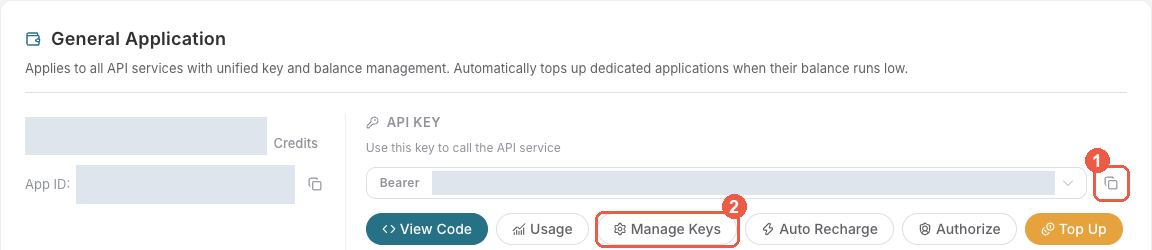
- Register or sign in and open Applications.
- Find General application; if absent, click Initialize General Application. General keys have only your account's permitted services; dedicated keys have only their application's service. Check selected model access and price/balance.
- Copy the API Key or choose Manage Keys → Create for a separate
LlamaIndex LLMkey.
- Review Expiration Time, Set Usage Limitation, Allowed APIs. Allow
/openai/chat/completionsif restricting APIs; create and copy the key.
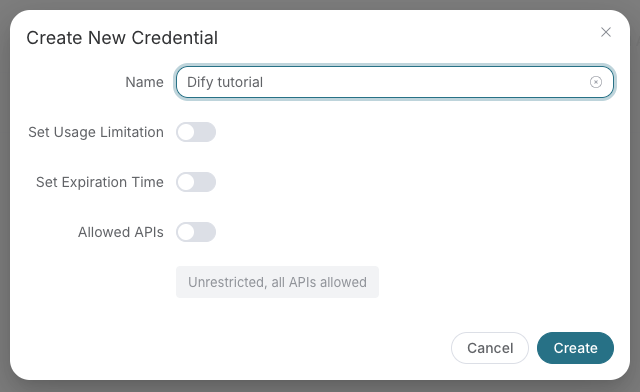
Screenshots are real redacted Ace console images from the linked SunoDify commit,
retrieved 2026-10-18. The old example name Dify tutorial is historical; enter
LlamaIndex LLM. These are account setup screenshots, not LlamaIndex model calls.
Copy only the raw token, without Bearer , spaces or quotes. Do not use a
platform-... management token. Keep it out of prompts, logs, screenshots and Git.
Set ACEDATACLOUD_API_TOKEN in your environment or pass api_token from a secret
store. OPENAI_API_KEY does not replace the Ace token. Constructor and metadata
inspection send no request. Model and context limit must come from your current
available model; there is no hidden model default or fallback.
from llama_index.core import Settings
from llama_index.llms.acedatacloud import AceDataCloud

llm = AceDataCloud(
    model="YOUR_AVAILABLE_CHAT_MODEL",
    context_window=YOUR_MODEL_CONTEXT_TOKEN_LIMIT,
    max_tokens=256,
)
Settings.llm = llm
There is no new provider dropdown or GUI promise: LlamaIndex Framework selects native LLM classes in application code. This gets an Ace class with preset identity, not merely a tutorial to paste a custom base URL.
The following requests may consume credits; run only with your own approved budget and a valid model. The placeholders above must be replaced first.
from llama_index.core.llms import ChatMessage

response = llm.chat([ChatMessage(role="user", content="Reply with one short greeting.")])
print(response.message.content)

# A separate billable request if run:
# for chunk in llm.stream_chat([ChatMessage(role="user", content="Say hello.")]):
#     print(chunk.delta or "", end="")
Async equivalents are achat, acomplete, astream_chat, astream_complete.
Chat is synchronous or streamed text; it does not create a media task to poll.
Suno/Seedance task lookup belongs to the relevant tool integration, not this LLM.
Tool calling is off by default. Only pass is_function_calling_model=True
for a model whose current contract supports it; then use
FunctionAgent(llm=llm, tools=your_tools). This flag is a caller-selected capability,
not a claim every model supports tools. Structured outputs are not universally enabled.
401/403/429/500 preserve OpenAI-client error categories; retries are fixed to zero. On ambiguous network errors inspect usage before manually sending another request. The token is excluded from model repr/serialization. Neither fixed endpoint nor credentials may be silently overridden through OpenAI keyword arguments.
pip install -e ".[dev]"
python examples/offline.py
pytest
ruff check .
ruff format --check .
python -m build
The consumer uses mocked HTTP and a dummy token, and clearly labels output
synthetic-offline. CI builds the wheel and installs it outside the source tree.
No paid chat or production model quality, billing, official listing or revenue is claimed.
| Problem | Check |
|---|---|
| Package absent on PyPI | Use the GitHub release wheel while PyPI quota is pending. |
| Missing token / 401 | Use the full raw Ace application token and check expiration/access. |
| 403 / insufficient balance | Check model entitlement and budget, not retries. |
| 429 / ambiguous network error | Automatic retries are off; inspect usage before sending again. |
| Tool call rejected | Only enable tools for models that support the protocol. |
| Wrong context limit | Read the selected model's current limit; this class does not guess. |
The existing authorized organization publisher is reused; no new account or Trusted Publisher setup is required for this token path. PyPI publication waits for the shared new-project quota; GitHub release assets remain independently installable. See distribution handoff. Official docs/default inclusion and real paid call/billing must be verified separately.
MIT. Maintained by Ace Data Cloud.