Repository navigation
Avoiding pump stop when njspc container is stopped? #546

Replies: 8 comments 69 replies

|
If you have the latest njsPC and dashPanel you can click on the ready icon and set the panel to timeout or device mode. This will release the pump. |

|
See this thread. #508 |

|
The only change that was made recently was to affect the pumps was to PM2 shutdown. We noticed PM2 was killing the njsPC before the pumps were properly shut down. I don't think that would affect docker and can't think of any other changes that would have affected the pumps in the recent past. |

|
I see, thanks gents. @tagyoureit - PM2 killing it might have been what I was inadvertently relying on before and docker probably isn't doing that. It would explain why my pump now stops when the docker container is shut down. @rstrouse, reading the thread, I understand the feature on the statusbar you mentioned requires relay equipment manager installed. Is there a dockerized version of REM on the drawingboard? After having had multiple node version conflicts I much prefer having anything nodejs encapsulated in containers to keep things tidy. That said, as I already have all my other equipment, incl. Pi running njspc under firm control of HA/NodeRed, it seems a bit much to install REM on top to get that single feature. Is there any chance that you guys might consider a tiny flag in the poolcontroller's config.json, something like "DontStopPumpAtShutDown" : true -Pretty please? :) |
|
It does not require REM. The user simply added hardware push buttons and LEDs at the pad that would toggle the system at the pad. They used REM to manage the hardware LEDs and buttons. If you are running the current repo click on the status bar and the feature will be there. |

|
Hmm, curious and curiouser. |
|
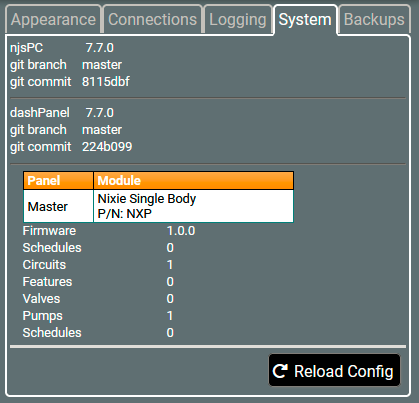
Your commit dates all the way back to May 30th. You need to pull njsPC and dashPanel then rebuild your image. |
|
Right, so I just did that: //before: //after //cleanup old images Starting up the containers again and loading the dashpanel, gauging by the commit numbers, it looks like both containers have updated:
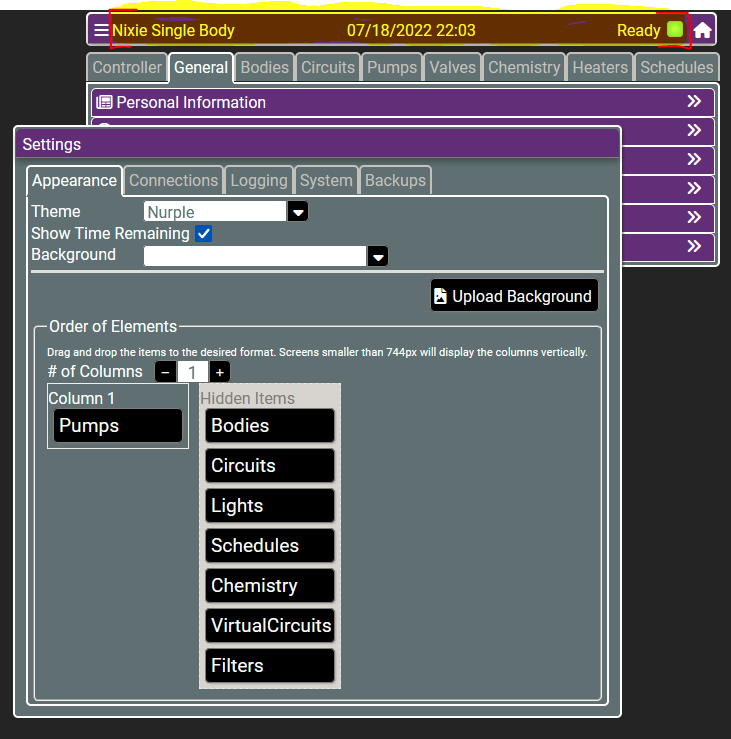
As you can see, the burgermenu and gear-menu's work fine, yet when I click anywhere in the marked area at the top, still nothing happens? Can you think of a good way to troubleshoot this?
|

|
Hard refresh your browser cache. |
|
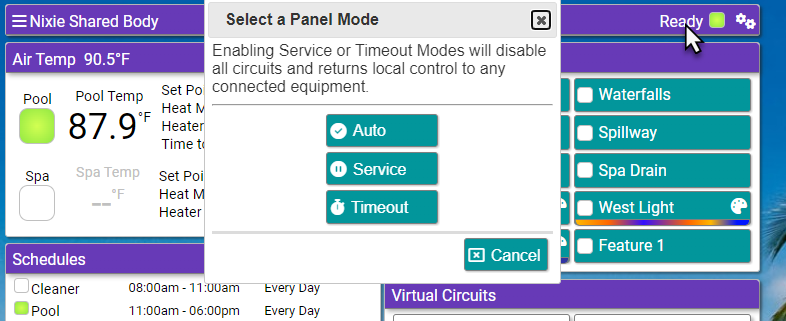
Clicking on the Ready text should bring up the following dialog. |
|
The timeout value is required for timeout mode.
|
|
When you engage the timeout it releases the pump so that the display should not say DISPLAY NOT ACTIVE anymore. This means that you can now set the speed at the pump. When the timeout expires njsPC will again take control of the pump. The same thing happens even if the messages stop after several seconds. At that point the pump programming should be in control and pressing any one of the speed 1-4 should make it start. |
|
Gents, thanks for the suggestions
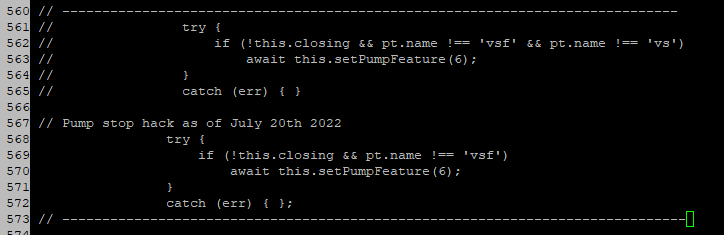
I restarted the container, unfortunately with no effect. I did notice in the same folder there is a Pump.js.map file, which I suspect is the minimized/"compiled" version, so I went into the container and renamed this file, and restarted the container once again. This produced an effect, just not the one I was looking for. Let me break down the sequence of observed events:
I can still obtain the required behavior by pulling the plug on the pump as it then will resume what ever locally programmed schedule is active at that time, however it seems njspc is still hellbent on stopping the pump. Only difference is now that the code change above seems to pretend the connection being broke (i.e. no immediate handover to the pump) yet with the preceding stop-command stil being sent, this doesn't make much difference unfortunatly. I noodled over your concern about security and equipment and as I said, I understand the security/safety concern as a precusor to the reluctance implement an option for this. However as I think about it, all it takes is a data plug falling out and a scheduled speed still to be present on the pump to pave the way for unforeseen behavior, which you would not be able to do anything about from the control side, since the connection is severed. In the scenarios you reference where safety is a concern, one could argue that the real security would be based on all locally programmed speeds being set to manual or disabled. @rstrouse - thanks for explaining the timeout option. I did test it and it, however it does unfortunately not resolve the issue with the pump stopping. I need the pool-tech to find the system as if it's being run locally, i.e. when he shows up, the pump is not being remote controlled and is running happily, not stopped. So, are there any other code-snippets you would have me try? |
|
The .map files only help debuggers step through the TS code when it the app is running the compiled JS code. I'm traveling this week. Instead of having you jump through some hoops which may or may not help you, I'll give this some more thought and try to test a couple things next week. |

|
Hi MaxVonEvil, Your post here caught my eye and I couldn’t help but wonder why it is so important that the pool-tech believe/think that your pool is being controlled locally and is not automated. Is he one of those pool guys that expect to have sole control of your pool? Just curious as to why the new service/timeout mode feature wouldn’t suffice in a situation like yours having a weekly pool service. |
|
You know we are simply releasing control. I wonder if you set njsPC to service mode and hit 1 on the pump if it starts. Then if you set njsPC to auto and give it some time to take over again (DISPLAY NOT ACTIVE). Then hit service mode again if it would go back to where it was on the pump. I do know that if we stop sending messages regardless of whether the cable is connected the pump release control and do whatever it does without any automation. I wonder if incidentally you turned off the manual program on the pump. |
|
@rock-crusher, it's part of the lease agreement. The legalese roughly translates to "Derp shalt not f***eth with poolgear", so here's le me doing just that, lol. @rstrouse, yes that is correct; once njspc releases control, the pump will start if you hit start/stop, or any speed button. My problem is that no matter what I do (except severing the data connection) will leave the pump in a 0 RPM stopped state, where the desired state is to have it resume local programming. Last I am not sure what you mean by turned off the manual program on the pump? What I can tell you is that I verified the local programming and there are 3 active schedules which run back-to back, i.e. the pump never has an off period. @tagyoureit, thank you! - as always your efforts are very appreciated. As I began the topic with, worst comes to the worst and we cant find an elegant solution, I can always resort to a pi-controlled relay, cutting one of the data wires, but I hope we don't have to go that route as it's what is generally referred to as a fugly hack ;) |
|
Hi guys, I have been somewhat following this and decided to try what rstrouse has been asking of MaxVonEvil. I too have been playing around with the new service/timeout modes and thought to try this just to see how mine reacts in this same scenario.
rstrouse, I am getting the same results as MaxVonEvil. When doing exactly what you stated above and put back into service mode the display reads 0 RPM, it's stopped and the only LED that is on is the green power indicator. BUT… This is how it is supposed to act correct? |
|
Yes this is how it is supposed to act. When you release control it looks like it sets the RPM to 0 which we definitely want to happen. This tracks with what a typical Pentair Panel does. The pump should be released and idle awaiting command from the local panel. I think that Max would like the software to simply stop communicating which in his case does not stop his pump. However, on my pumps if that happens they stop within a minute. It may depend on the IntelliFlo version though because I have the original 4x160 pumps. I wonder though if setting a program on the pump to be scheduled might start that schedule on the pump. My pumps do not have those options. |
|
Gents, glad to hear that I'm not the only one seeing this. As for how it is intended to act, I understand where Tag was coming from with security concerns. However if different use-cases such as ours are in scope, perhaps a configuration file entry to halt comms would be in the realm of the possible? This would to address those Pentair pump-firmwares which apparently behave subtle different ways. Thanks |
|
Hey since I cannot make what you are doing happen, can I get you to go into the RS485 Ports Tab and simply disable the port to see if it gets us there for your situation. |
|
FYI - I'm going to be traveling again this coming week and won't get a chance to look at this. Still on my radar, though. |
|
I will try and do that. Unfortunately it may be a few days as we had a flood in the neighborhood and my pool looks like it's filled with chocolate milk, i.e. all my gear is offline until we can get the silt cleaned out of the pool. Will give a shout as soon as I get to try this |
|
Sorry to hear this Max, hope all goes well with the cleanup. |
|
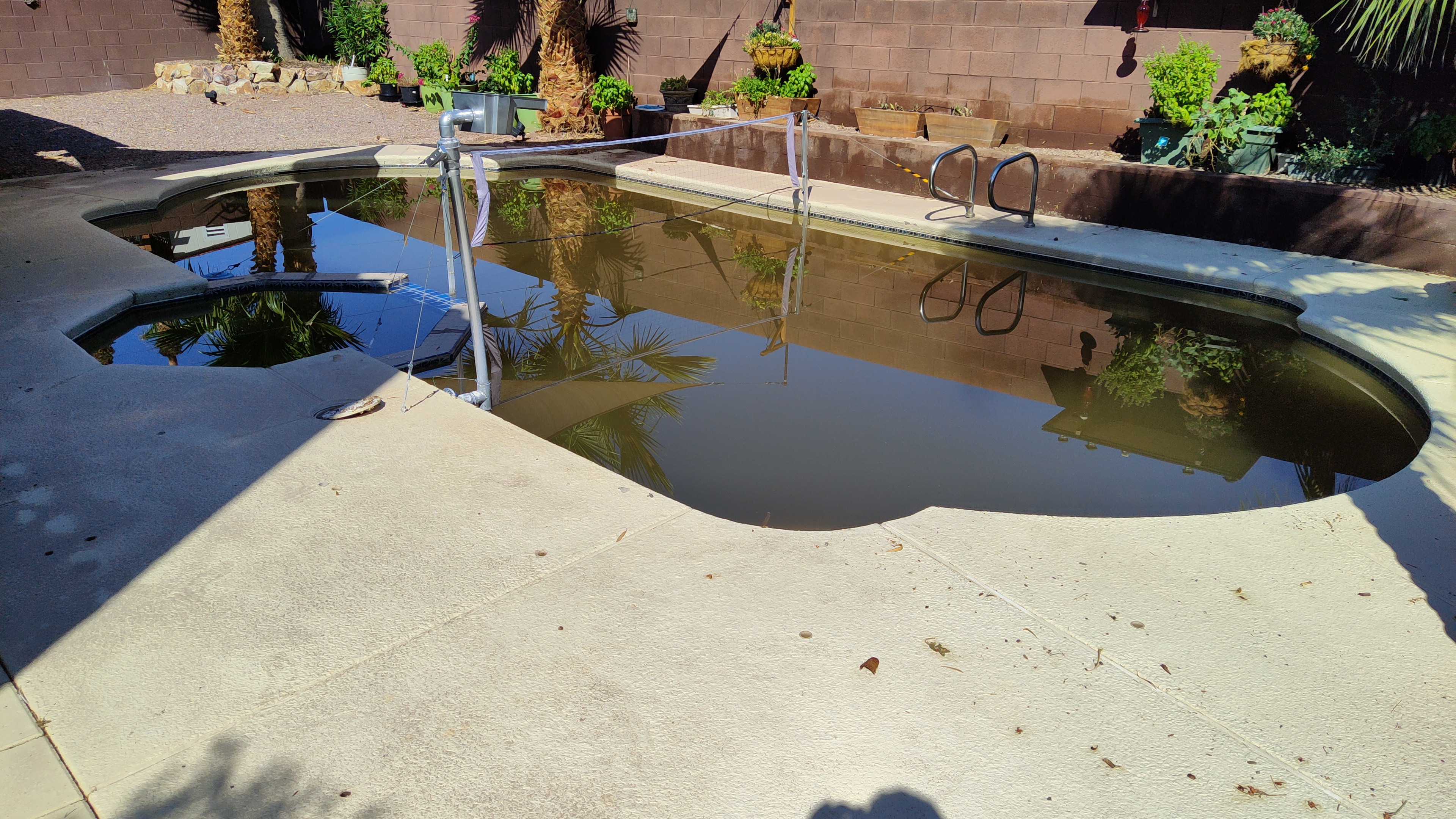
Thanks guys appreciate it, this is what the neighborhood looked like last night and what the pool looked like this morning Instant frog pond, yuck. |

|
Yeah that looks like a mess. I see the sun in the pics so that is a good sign. |
|
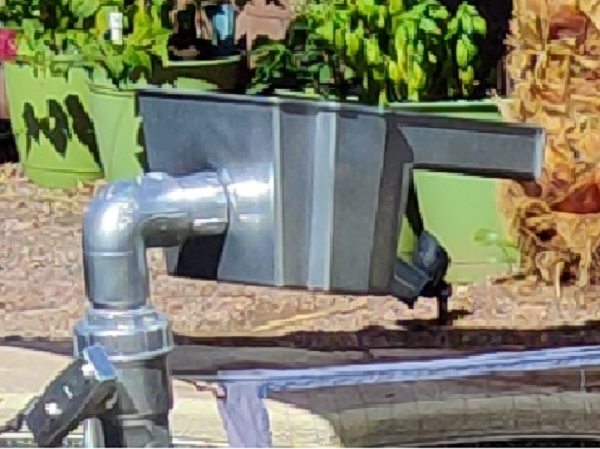
Wow, that is a mess, I’m sure it will be drained, cleaned etc. Excuse me Max, this box thingy, what is it and what’s its purpose, very interesting to say the least.
|
|
Sure, It's a waterfall box painted to match the pipework. Wifey was tired of the regular double pipe splashing water out, as it was noisy as hell. The box delivers a nice flat flow which only makes a third of the splash sound (color me nerd, but I have a dB meter to back me up, lol). Anyway, you can find the box here https://www.lowes.com/pd/smartpond-Black-Pond-Waterfall-Box/1000598779 I've got another project on the back burner to construct a set of laminar flow jets, but that's a story (and topic methinks ;) for another day. |
|
@rstrouse, so hey - finally got the backyard and pool rehabilitated as of yesterday (besides flushing out the pool and all the pipes a shopvac and a pressurewasher set to stun did wonders) Anyway, I got around to trying your suggestion of manually disabling the RS485 interface in njspc dashboar. It actually works! After about 45 sec the pump falls back to it's local programming, i.e. it does not stop, yay! So, I guess I need to understand how to do that either through a commandline or the REST API. I checked the swagger site, may be somewhat outdated, yet there is no obvious mention of any method to change the RS485 port, yet since one can do it from the dashboard, there's obviously something that can do it? Anyway, if you guys can give me a kick in the right direction it would be appreciated as always! |
|
When I get back in town I’ll look it up. In the mean time you can see exactly what dashPanel is sending from the browser console in chrome. |
|
This is what @rstrouse is talking about.
If you only have one port it will be portId 0 and you can send a PUT to I didn't get to look at the older commands for setting the pump to the right state, and as long as this works for you I won't bother. Glad we found a solution. |

|
@tagyoureit, @rstrouse
|

|
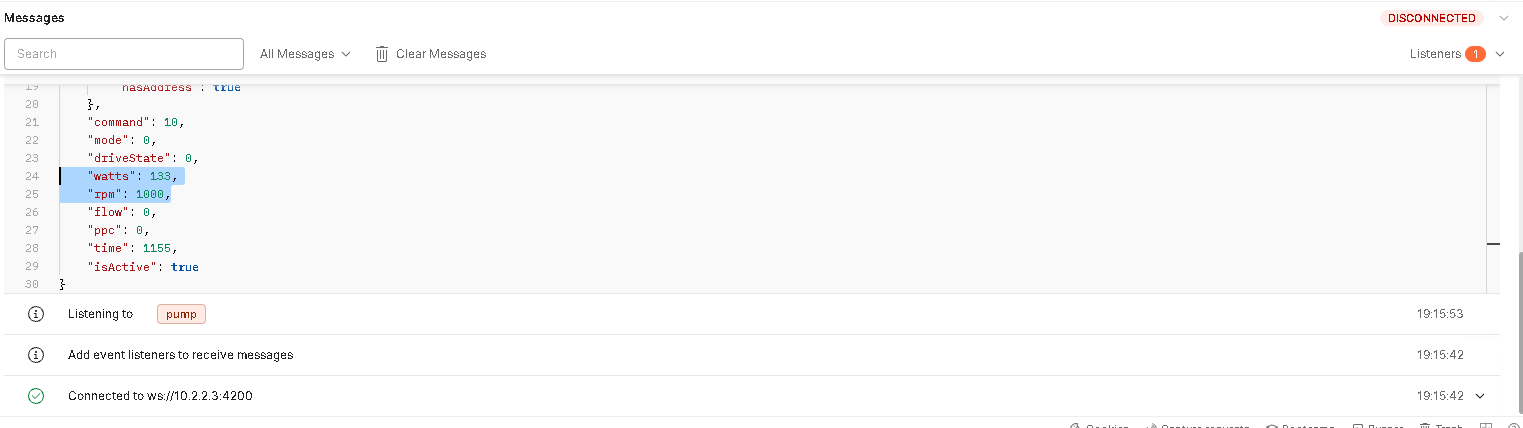
One minor item, this might be either rather generic or the wrong place to ask, but here goes: As per your suggestion, I was looking in the browser's debug console and sure enough, I can see all the messages from the pump, the ones I am interested in is the wattage and and rpm's: As things are now, I subscribe to these values via MQTT, yet since I'm doing everything else through the API, it makes sense to somehow subscribe to the the messages above and eliminate MQTT altogether for this project. Problem is I don't know enough about API subscriptions if there is such a thing. Am I limited to doing a interval polling like GET /state/pump/50 and then pulling the watts and RPM's, or is there a smarter way? |

|
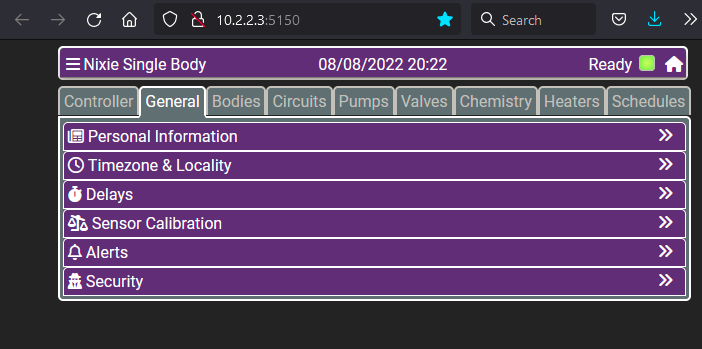
Are you sure that 10.2.2.3 is the IP address for njsPC? Yes the data payload for socket.io and websocket.io are different. The latter is much less robust and needs to be manually parsed. |
|
Yes, pretty sure as dashpanel and controller live on the same Pi: Other than that, I've been unsuccessful in finding a sockets.io node for Node Red as many repos have not been updated in months or years. Many of these are coded to support only up to Node 14 and now with Node Red 13.x we are on Node 16. All that said, I would still have expected postman to work? Could it have something to do with that I run NjsPC in a docker container? |
|
I don't have any experience with docker. But I have to say that for something that is supposed to make things run reliably all the time it seems to be one of the largest thorns in this developers side. I suppose applications that are not built cross-platform may benefit but between the permission issues and access to other resources it appears to be a PITA. Either way I do not believe that docker is the issue in this case. For Postman update your postman client. There should be a dropdown on the upper left that indicates whether you are using a raw or Socket.IO socket. You want Socket.IO. The beta version of the Postman socket implementation didn't retain the Socket.IO agent. |
|
Hi guys, been away for some days as hacker-week is winding down here in Vegas. Docker: Postman:
Proxy oddity:
If I uncheck the proxy box, the dashpanel finds the server, yet it won't connect:
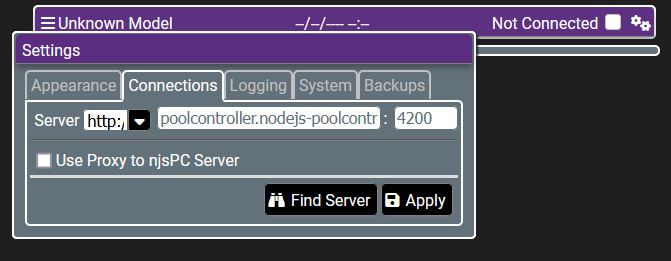
This seems somewhat weird as both components are running on the same pi, albeit in different docker containers - is that the purpose of the proxy function per chance? Just wondering out loud if it's docker giving more grief? Nodered: |


|
Try using the IP address 172.22.0.3. Very odd that the ip is so different than it was previously. A completely different local net. |
|
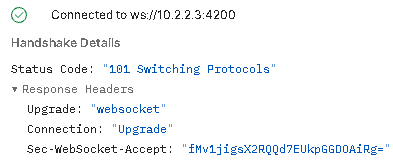
Thanks @rstrouse - I looked further into this and it seems to be all Docker... (sorry Tag). It looks like it creates a unique IP for each container, this is where the 172.22.x.x addresses are coming from. while the address can be pinged when SSH'ed locally into the Pi where the containers are running, one can't reach these addresses from outside, unless we start modding routing tables, which should not be necessary. It seems docker automatically adds the internal routing table entries. Besides when you hit the Pi's wlan0 ip address on port 4200 it gets routed to the docker container portmapping configured in the docker-compose.yml If you examine the screenshot above (big white one) you can see that Postman (running on another computer) actually connects to njsPC:
It might very well be that I don't know Postman well enough, yet it seems I need to add a listener. |
|
Actually I meant 3 rights which would have been left. |
|
@rstrouse, pretty sure I'm on the latest and greatest Postman - If you look at my screenshot I posted earlier here, you'll notice that I'm in fact connected to Sockets.io (upper right) to ws://ip:4200 (lower left) and a handshake has happened. However I do not have any listensers configured in the lower right, as I am not sure how to configure those? I can see from the screenshot earlier from @tagyoureit that he's got 3 listeners configured, but not what they look like. Any chance you can share how those are configured? Thanks! |
|
Oh you need a listener. The listener will be any of the emits you see in the browser console. Simply click on the listeners at the lower right (got the correct hand this time) that says Listeners. Then enter any event name you want to listen to. Some valid selections include:
|

|
Ah-HA! it was exactly those magic words I was looking for: While I knew where to put them, I think I might have gotten close as I tried with temp, but it was in PLURAL, curses! 😂 Anyway I just need to find a working socket.io node for NodeRed and I'm golden, but that's a conversation for another forum. Thanks for the help! |

Please post back here if you do! |


Uh oh!
There was an error while loading. Please reload this page.
Hi @tagyoureit et. al
TLDR; poolpump receives a command to stop when njsPC docker container is stopped. Can that be avoided through configuration?
Since upgrading to 7.7.0 I've noticed something different in my setup: Once a week my pool guy comes around to clean the pool, he hooks up his own gear and puts the pump on speed4 set for 3100rpm. He does this manually as he needs to stop the pump to stick the vac hose in the skimmer's intake. After he's left (trust me, my hpuse knows ;) I take back control of the pump with NjsPC.
As you know when NjsPC takes over the pump, the local panel on a Pentair Intelliflo VS reads; "DISPLAY NOT ACTIVE" and the keys are disabled, i.e no manual control for Mr. Poolguy
What I used to do was once a week stop njspc from running in the morning before he arrives so after 30 sec or so, the local programming on the pump would kick in.
However somewhere between v7.7.0 and 5.x it seems that NjsPC's behavior changes. If I do a 'docker stop poolcontroller' it seems a stop command or rpm=0 (same difference) is sent to the pump, rather than let it resume it's on-board programmed schedule
Here comes my conundrum: Is it possible to avoid that behavior? I noticed that if I pull the data plug physically from the pump, it does what it used to do; fallback to local scheduling. So if all else fails I suppose I could let my RPi control a relaymodule on a GPIO port which cuts the data connection physically. But it seems like a hack even McGyver would facepalm over, so before I break out the soldering iron, I figured I'd ask the experts that the best approach to getting the behavior back
PS: Please don't suggest that poolguy has to pull the plug, press a IoT button etc, he's an old guy set in his ways, yet does a bang-up good job overallso I'm just trying to make sure the automation gets out of his way when he's here.
Hope there is an easy solution to this.
Thanks,
Max
All reactions